Trezor's X account was hacked late in the evening of 19 March. Whoever got access to it advertised the presale of a fake $TRZR token on the Solana blockchain. Users were asked to send SOL to an address posted in the tweet. Trezor has regained access to their account and confirmed the hack. They also said that they used a strong password and had 2FA activated on Twitter. Some speculate it was a SIM swap attack. According to ZachXBT, the hack wasn't successful compared to many others. The address received a little over $8,000 in SOL. Crypto companies that are responsible in part for safeguarding user's sensitive information need to up their own game. 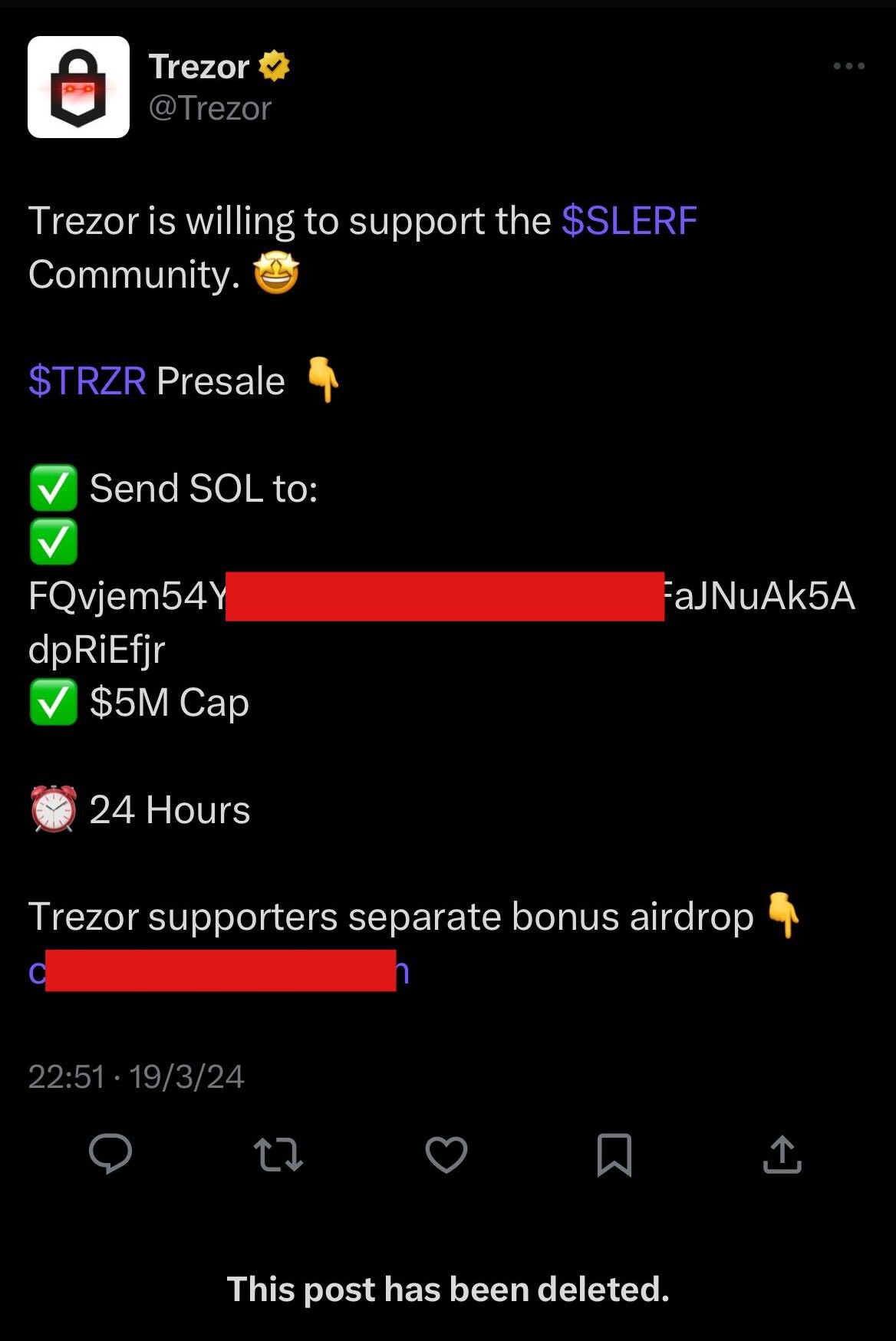 |
|
|
|
We have heard of storing seeds on paper and metal and now there is a new method to do it on soda cans.  The company BitCan has released its solution for a DIY Bitcoin Seed Storage. What's interesting here isn't the material used to store the seed but the type of encoding using glyphs. What you need to create your seed- A soda can
- A flat-head screwdriver
- A pen
- A piece of paper
- A printer to print out the template
BitCan has created a template that anyone can print, and it looks like this:  After you print the template, you can translate your seed words into glyphs. You should already have a securely generated seed. Each word from the wordlist has its unique pattern, which you can see on the website. Here is an example: 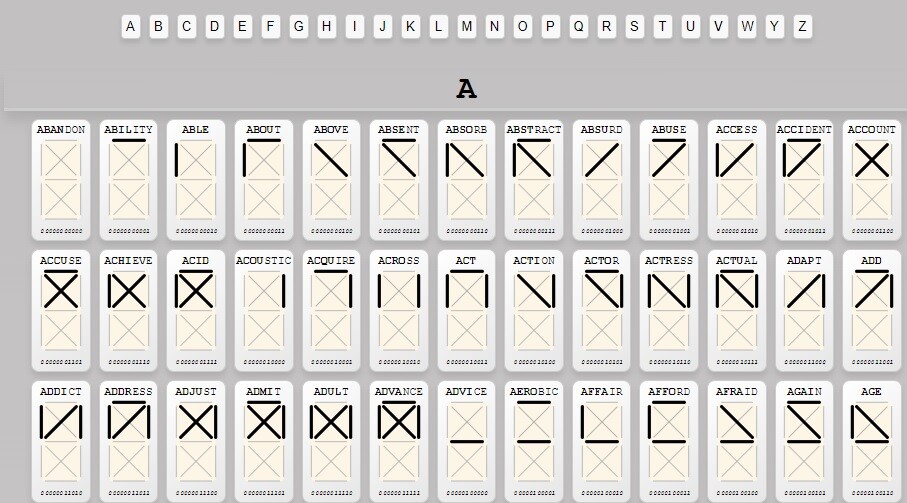 Setup Process Setup Process- Using the table with the glyphs, draw your seed words on the printed template.
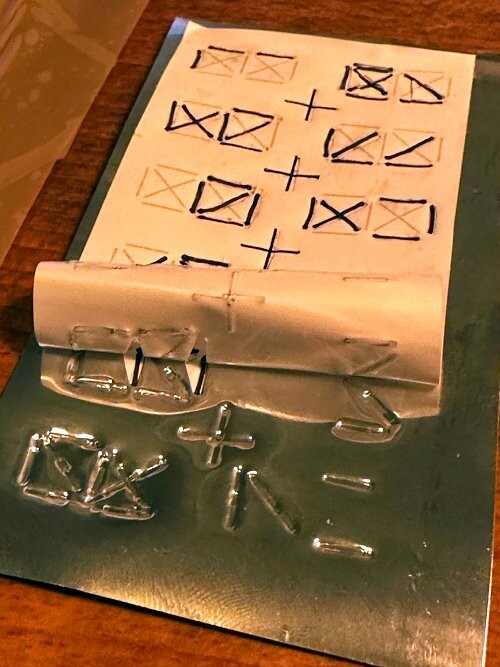
- Stick the filled-out template on a flattened soda can.
- Take a screwdriver and etch the glyphs into the can. Use a light hammer if necessary.
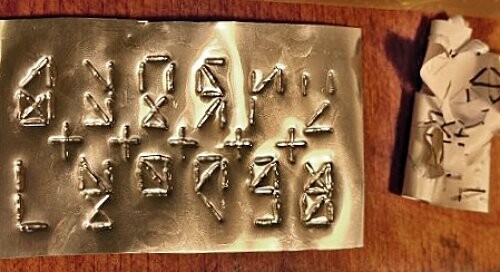
- Double-check if everything is correct, and find a place to store the metal backup.
Here are a few pictures of how it could look: 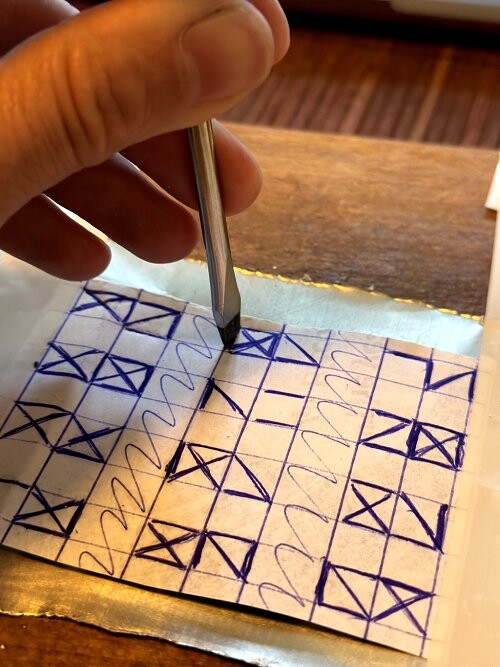
| ..................................... |
|  |  |
- BitCan recommends writing down all glyphs on a piece of paper. Better yet, use the provided template.
- Look at the bottom square of each glyph first to identify which starting letter the symbol belongs to.
- After that, identify the upper square to find the correct word.
- An alternative is using binary search to go through the word list.
Pros1. It's inconspicuous. You wouldn't know what it is even if you saw it somewhere. Even those familiar with seed phrases wouldn't know what they are looking at unless they know about this seed storage method. 2. It's cheap/free. It requires zero investment, assuming you own an aluminum can, a pen, a screwdriver, a piece of paper, and a printer. 3. Easy to hide because it's thin and small. 4. Can be hidden in plain sight. If you are interested in ancient civilizations and have items or artifacts in your home, you could hide the plate there and make it seem like they are symbols from ancient history. 5. It provides protection against water and moisture. 6. You can use the glyphs system to make seed backups on better-quality materials than aluminum soda cans! Cons 1. It won't protect you against heat from a house fire. 2. Aluminum is more prone to corrosion than other more durable metals. 3. The encoding and especially the decoding process is time-consuming. 4. The possibility of making a mistake is greater than when backing up common seed words. Source: https://bitcan.world/ |
|
|
|
|
I am looking for people who would occasionally be interested in accepting my BTC in exchange for USDT on the Tron network and DAI.
No newbies and brand new accounts.
The sums vary depending on my needs.
Post here if you are interested and send me a PM.
|
|
|
|
The question of whether Bitcoin was created by the NSA has popped up several times. Some believe that Satoshi was an NSA agent. We know that the secret documents Edward Snowden made public made interesting revelations. Among them are the backdoors the NSA inserted in Pseudorandom Number Generators. PRNGs can be intentionally weakened to allow backdoor access, enabling an entity with knowledge of the backdoors to predict the outputs of weak generators. Any system relying on such PRNGs would thus be insecure. The NSA has looked for ways to decrypt encrypted data to gain access to it. They managed to do that by compromising the Dual EC DRBG algorithm, which was thought to be secure. In a different example, the NSA reportedly paid $10 million to the encryption company RSA to use a weak encryption algorithm, which the NSA had a backdoor to. It was for a protocol that was certified in the US by the National Institute of Standards and Technology (NIST). We know from other sources that the NSA and the UK's GCHQ have the tools to decrypt emails, online banking accounts, etc. A US program paid tech companies millions to favor their weak RNGs and insert intentional weaknesses that the government can exploit. The agencies also cooperate with ISPs and telecommunication companies. The NSA has also exploited internet cable taps and tried to find ways to decrypt data from Google, Hotmail, Yahoo, Facebook, etc. Security agencies have ways to break the encryption of fiber-optic internet cables.
When Satoshi created Bitcoin, they could have used a certified method to achieve randomness. One of those that turned out later to be backdoored and weak. Instead, they used an uncertified method in ECDSA and secp256k1 for key generation. One might wonder if this was just a coincidence or a choice made by someone who knew about the backdoors in certified RNGs. Did Satoshi have insider knowledge about potentially vulnerable algorithms, or did they make their own conclusions that certified encryption wasn't safe based on their programming and cryptographic knowledge? Insecurities in certain certified systems were already found as early as 2007/2008. It could well be that Satoshi knew about this and had nothing to do with the NSA.
I don't think Bitcoin was created by the NSA or a similar agency. I also don't think Satoshi was an NSA operative in any form. I believe he thoroughly studied encryption algorithms and cryptography before choosing what key generation method to adopt for Bitcoin. But it’s an interesting idea. What do you think? Was Satoshi in the NSA or just a knowledgeable programmer who appeared at the right time? Sources and further reading: https://www.reddit.com/r/Bitcoin/comments/1alb982/saw_this_video_was_wondering_what_you_guys_think/https://archive.nytimes.com/www.nytimes.com/interactive/2013/09/05/us/documents-reveal-nsa-campaign-against-encryption.htmlhttps://www.theverge.com/2013/12/20/5231006/nsa-paid-10-million-for-a-back-door-into-rsa-encryption-according-tohttps://www.theguardian.com/world/2013/sep/05/nsa-gchq-encryption-codes-security |
|
|
|
Šta je /][banned mixer] projekat?Mi smo prva platforma koja svakome omogućuje pokretanje vlastitog biznisa i da profitira od usluga anonimizacije kripta. Možete postati i partner i investitor. Jambler ne posluje direktno s klijentima. Ovaj pristup je vrlo sličan referral programima i izbjegava sukobe interesa između platforme i partnera. Naš algoritam naravno podrazumjeva prodaju čistog bitcoina sa mjenjačnica kriptovaluta partnerima koji koriste našu platformu. Jednom riječju, Jambler kupuje ouput transakcije sa mjenačnica kriptovaluta i/ili od rudara, provjerava njihov kvalitet i preprodaje ih partnerima koji potom komuniciraju s krajnjim klijentima. Svrha našeg poslovanja je omogučiti sigurnost vlasnicima kriptovaluta i sigurnost njihove štednje. Mogu li vam povjeriti svoj novac?Svi [banned mixer] korisnici, partneri, prodavači (investitori) i krajnji korisnici zaštićeni su od slučajnih i namjernih grešaka. Sve dolazne transakcije se potvrđuju jamstvenim pismima potpisanim PGP-om. Da biste provjerili jamstveno pismo, instalirajte PGP softver (na primjer, PGP4Win), importujte /pgp-key.txt]javni ključ [banned mixer] sa web stranice u instalirani softver i potvrdite digitalni potpis. Kako mogu pokrenuti vlastiti posao? Vrlo je jednostavno! Ne morate vi koristiti algoritme miksera ili tražiti finansije da biste došli do sredstava, mi smo to učinili za vas. - Registrujte se na [banned mixer] web stranici kao partner, navedite BTC adresu za primanje profita i proviziju za miksanje, konfigurirajte automatsko povlačenje sredstava i unesite naziv svog projekta. Platforma će generirati BTC adrese, izdavati jamstvena pisma u vaše ime, kontrolisati novčane tokove i slati vama vašu dobit.
- Uradite dizajn web stranice svog miksera ili koristite jedan od šablona koji smo pripremili za vas. Na svom ličnom nalogu možete pronaći HTML šablone za Tor i Clearnet verziju miksera i PHP gateway za povezivanje s našim sustavom. Preuzmite to i uploadujte na svoj hosting.
- Vaš mikser je spreman za rad, sve što treba da uredite je da privučete klijente. Od svake transakcije ostvarivat ćete prihod od kamata. Dobivat ćete obavještenja od platforme putem Jabber ili Telegrama o novim zahtjevima i izvršenju transakcija putem vašeg miksera.
Zašto mi se isplati koristiti [banned mixer] za investiranje?Prvo, imamo stalnu potražnju za transakcijama sa mjenačnica za koje smo spremni platiti bounty nagradu. [banned mixer] stalno kupuje output transakcije sa Bitcoin mjenačnica i za to plaća bonus od 1%. Prosječno vrijeme povrata investicije je 12 sati. Dalje, naš poslovni model je transparentan. Jasno pokazuje od kojih sredstava [banned mixer] isplačuje provizije prodavačima/investitorima. Kako bi se uklonili rizici od prijema kriptovaluta sumnjivog porijekla, sav Bitcoin od investitora se provjerava sustavom bodovanja, uključujući korištenje blockchain analysis kompanija. Transakcije koje su prošle provjeru, ulaze u sustav a transakcije koje ne prođu provjeru, vraćaju se klijentima na istu adresu. Ova faza omogućuje zaustavljanje pokušaja nepoštenih investitora da iskoriste svoju investiciju kao mikser kako bi očistili svoj novac i istovremeno ostvarili profit. [banned mixer] ne koristi kriptovalute koje nisu prošle sigurnosnu provjeru. To je neophodna sigurnosna mjera. Koje mjenačnice podržavate?Poloniex, Binance, Korbit, Bitfinex, Bitstamp, Pbit, GDAX, Okcoin, Kraken, Gemini, BTCC, CEX.IO, itBit, Simex, Lakebtc, Exmo, Bitbay i Livecoin. Spremni smo vam biti na usluzi 24 sata dnevno tokom cijelog perioda naše suradnje. Naš moto je anonimnost, brzina i pouzdanost. Cijenimo svoj ugled i vaše povjerenje. Kontaktirajte nas i provjerite najnovije informacije. Napravite svoj profitabilni Bitcoin mikser i počnite pisati svoju vlastitu priču o uspjesima s /][banned mixer]Email: support@[banned mixer]
[banned mixer] PGP fingerprint: B8A5 CFCA F63F F2D8 384A 6B12 D3B2 8095 6F0E 7CAF
|
|
|
|
I just came across this article, and it seems it hasn't been discussed here. The Biden Administration Wants To Create A Registry Of Bitcoin MinersMy first thought: What could possibly go wrong with a war-hungry and war-supporting government, which is in great debt to have an updated list of all Bitcoin mining operations on its soil?  It could perhaps come in handy if a war on Bitcoin is declared or new revenue sources need to be found to finance the pursuit of freedom and democracy.
Let's get to it. the Biden Administration announced an emergency data collection initiative targeted at bitcoin mining operations in the US via the US Energy Information Administration, an "independent" sub-agency of the Department of Energy. It seems that the Biden Administration is identifying the electricity usage of the bitcoin mining industry as an emergency that is threatening grid stability throughout the US, as is evidenced by the name of the survey; "Proposed Emergency Survey - Cryptocurrency Mining Facilities." Here are a few interesting points from the article: - They require that all mining facilities respond and fill out the survey as it's required by law. - The companies need to submit their addresses and points of contact. - The companies must state if they are mining Proof-of-Stake or Proof-of-Work coins. We all know this is bullshit, as Bitcoin is the target here. - The companies need to state how many facilities they have in the US and provide precise coordinates. - Mining companies must state the number of miners, their models, and the number of produced hashrate. - EIA also requires information about how much electricity is being consumed. - They need to name their electricity service providers. Source: https://tftc.io/eia-bitcoin-mining-survey/Official survey announcement: https://www.eia.gov/pressroom/releases/press550.php?ref=tftc.io |
|
|
|
Trezor has just informed the public that there was a security incident on 17 January 2024 that affected their third-party support ticketing portal. Someone gained access to the platform and certain sensitive data. Here is what is known so far: - The hack DID NOT compromise the hardware wallets or seeds of users in any way. - Trezor was not hacked. A third-party service they use was compromised. - The hack affected users who may have been in contact with Trezor customer support since December 2021. - It's believed that up to 66,000 users may have been affected. - The leaked data involves email addresses and names/usernames used. - The hacker already contacted 41 users and requested they email him their seeds to "check the firmware version on their device." Trezor has already started contacting the 66,000 users they believe may have been affected. If you are among those, expect an email from noreply@trezor.io today or tomorrow. Here is an example of the phishing email that customers received from the hacker: 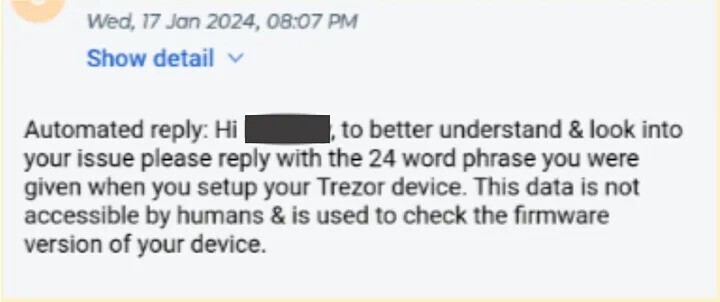 What now? Nothing changes. Never enter your seed or send it to anyone, no matter who asks. Think before you do anything that might compromise you and your funds. You can read a detailed report on the security incident on the Trezor blog: https://blog.trezor.io/trezor-security-update-stay-vigilant-against-potential-phishing-attack-bb05015a21f8 |
|
|
|
A group of researchers carried out a test to investigate the randomness of fair coin flips. They collected 350,757 coin flips, recorded the results, and concluded that when a person tosses a coin in the air, it has about a 51% probability of landing on the same side it started. This same-side bias varies and is different from person to person. Some have almost none or very little bias, while others display a more significant bias. The researchers believe the bias comes from the rotations and wobbliness of the coin, which causes it to land on the same side more often than not. They posted this data in support of their hypothesis: Pr(same side) = 0.508, 95% credible interval (CI) [0.506, 0.509], BF same-side bias = 2364 Their research also confirmed that the coin is equally likely to land on both heads and tails if those were the starting positions (the side that was up). They didn't record a bias that one side is more likely to end on the same side than the other. Pr(heads) = 0.500, 95% CI [0.498, 0.502], BF heads-tails bias = 0.183 They carried out the test with 48 people who used 46 different coins and denominations. The total number of coin flips was 350,757. The results show 178,078 landings on the same side. The researchers did mention a concern they had. The people who participated in the test were aware of the main hypothesis they were testing. With that in mind, manipulations or attempts to manipulate the results to either prove or disapprove the theory are possible. The source also mentions the scope of this same-side bias in a betting scenario. If you bet $1 on the result of a coin toss to get $2 if you predict correctly or lose the $1 if you predict wrong, you would earn an average of $19 after 1000 coin flips. But knowing the starting position of the coin is essential. Could these findings lower the security of seeds generated from coin tosses, considering that the starting positions of the coins aren't known to a third party? I remember that o_e_l_e_o recommended using von Neumann's unbiased coin flipping algorithm in a similar discussion from a few weeks ago. One more reason to use this algorithm if coin tossing is your system of generating seeds. Sources used: https://arxiv.org/pdf/2310.04153.pdfhttps://arxiv.org/abs/2310.04153 |
|
|
|
We had thousands of broken image links after Imgur stopped working on the forum. Many users have replaced their old links and migrated to other services, like TalkImg. But there are still many images to fix. I didn't do anything with my old Imgur images until two days ago when I decided to try TryNinja's Imgur to TalkImg script. Everything has been corrected now. Because it's so easy to use and fully automated, I figured I should create this thread that we can use to tag active Bitcointalk members we find who still have broken Imgur images in their posts. It will help to clean up the forum and make it look better. Most users use a notifications bot nowadays, so a simple @username should do the trick and make them aware of this topic. TryNinja explains how to work with the script here: [Script] Imgur to TalkImg - automatically fix your broken images. Please read it. You will find the code for the script in his OP, but here it is again for reference: https://gist.github.com/ninjastic/36c14fb2eb1c4b750f40f332d408688fAlways verify and compare the provided link above to see if it's the same as in TryNinja's topic before you use it! Simple how-to guide: The code goes through your entire post history, finds Imgur links, uploads the images to TalkImg, and edits your posts with the new links. The script doesn't require your forum login data, and you don't have to edit the code in any way (unless you want to) for it to work. Modifying the code to fix images from other image hosts is possible if needed. In my example, I had some pictures on vgy.me that were deleted. 1. Copy the codebase from the official gist.github link. The link is provided above. 2. Open any Bitcointalk forum page. 3. Click F12 or right-click with your mouse and select 'Inspect' to open the Developer Tools window. 4. Click on the 'Console' tab, which you can find between 'Elements' and 'Sources'. 5. Paste the code from gist.github and click enter. 6. Let it work until it reaches 100%. Don't use the forum for browsing and posting during the image upload process to avoid issues. If you have questions or run into problems, please post them in TryNinja's topic > [Script] Imgur to TalkImg - automatically fix your broken images. Please don't PM users and bother them about their broken image links. You never know if someone might react negatively and report you for PM spam for whatever reason. Just mention their username and tag them here; if they want, they will respond. If not, give it up and don't bother them anymore. Use any message you want. Here is an example that I will start with. I would like to thank TryNinja for creating the script and joker_josue for TalkImg! |
|
|
|
|
This topic has probably been covered many times, but I have a few questions I want to address.
As an intro, we can use dice to generate a seed phrase. Bitcoin hardware wallets/signing devices such as Coldcard or Seedsigner allow you to input the results of 50/99/x number of rolls and convert that into a seed.
A big danger of using dice rolls is if the dice are biased and more likely to land on one or multiple numbers. It affects the randomness, hence the security of your seed and Bitcoin. A truly unique dice roll is one where each outcome is equally likely. If one or more numbers have a greater chance to land on top, that is obviously not the case. It limits the keyspace from where the seed is generated, making brute forcing easier. Surely not easy enough, but easier.
A couple of questions:
In what ways are dice biased? Is the bias random?
For instance, am I more likely to roll a 2 than any other numbers on dice #1 and a 3 on dice #2?
Are dice manipulated on purpose, and if so, manipulated to achieve what results (rolls)? Or is the bias a result of low-quality production? If they are not manipulated on purpose, and the bias is random for each dice, wouldn't it even out if I have multiple dice (10, for instance) and roll them as many times as possible? If each dice is biased to a different number, can we really talk about a significant loss of randomness in the final result?
To take this further, how could someone take advantage of the bias in my dice to bruteforce my seed without knowing what that bias is? Even if 8/10 of my dice are biased and only 2 produce near-perfect results, wouldn't you need to know the exact bias to brute force my seed? If my thinking is correct, having knowledge of this bias would be essential for whoever or whatever is trying to hack my seed phrase because, based on the results alone, you can't possibly know that one of my dice has a tendency to roll a 2. In theory, if I throw 10 dice in the air, biased or unbiased, they could all show the result 2. Very unlikely, but still possible. How would the attacker differentiate the biased from the unbiased rolls?
As a way to mitigate bias, it's better to use different types of dice from different manufacturers, sizes, etc. Although I can't possibly see all dice from manufacturer #1 as being biased to the same number and the dice from manufacturer #2 to a different number. It must be a random bias.
When we are on the subject of manually testing a die, it's very difficult to discover a slight bias. Obviously, if every second roll lands on the same number and you rolled it hundreds of times, it's enough proof that something is wrong. If all numbers appear in what seems to be a random fashion, it isn't easy to come to a conclusion. Randomness means that the number 5 could be rolled 1/10 times. But even if you roll it 7/10 times, we can't talk about bias if you don't get approximately the same number of unexpected results after dozens and hundreds of attempts.
|
|
|
|
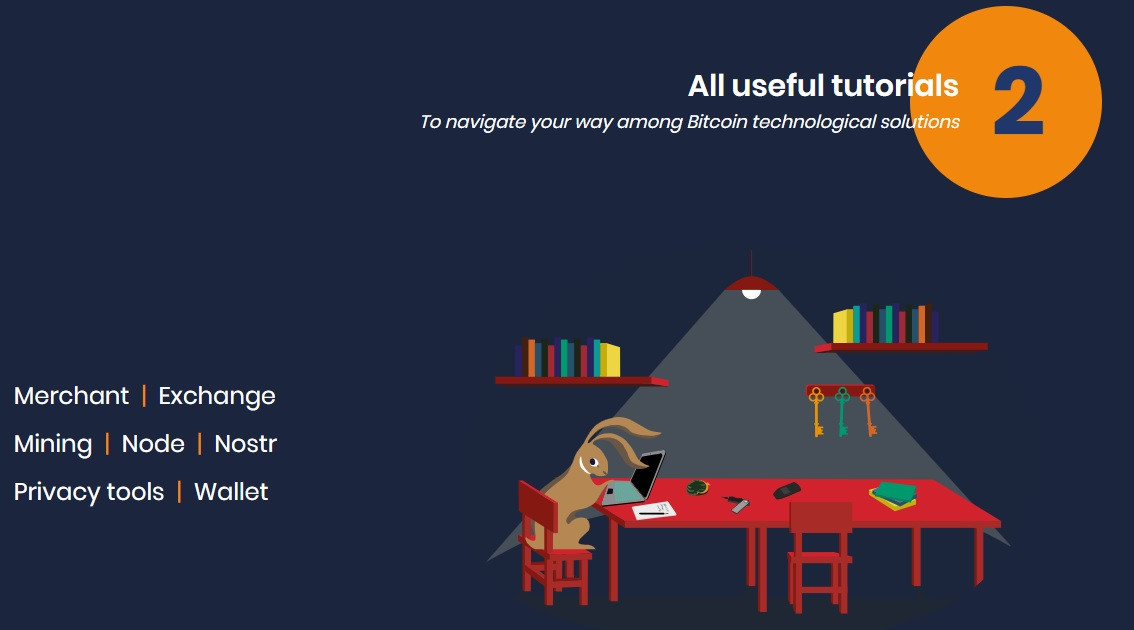
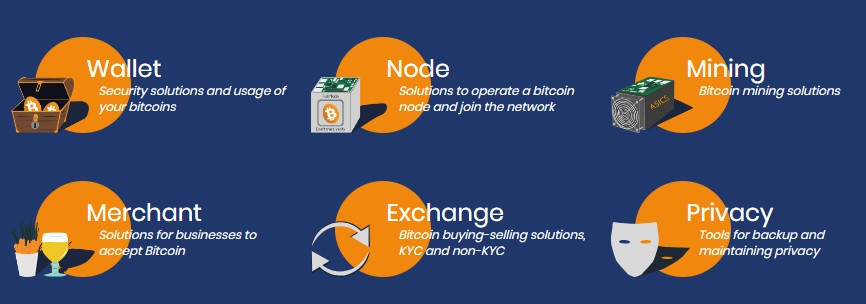
I came across a new resource that might interest beginners willing to read and learn about Bitcoin. It's called The Sovereign University. According to Ninjastic Space, it has never been mentioned on this forum before. - The platform has Free Courses you can start at any time. They are grouped according to your Bitcoin knowledge: Beginner, Intermediate, and Expert. - The Resources section contains a library of suggested books to read, podcasts, and a builders portal. - The Tutorials section is divided into Wallet, Node, Mining, Merchant, Exchange, and Privacy pages. Since the courses section is probably the most interesting one, I will cover that in more detail. There are 8 courses, each one with multiple chapters. 3 are beginner, 5 intermediate, and 1 expert course. Each course has a textual tutorial and a YouTube video. Sadly, the videos are in French and won't be helpful for many members. The Tutorial section has a lot of content. There are both textual and video guides. Some of the videos are in English, others are in French. Here are some of the topics you can learn about: Screenshots
Source: https://sovereignuniversity.org/ Disclaimer: I have no connection to the site, nor is this a paid advertisement. |
|
|
|
Ledger's security team Ledger Donjon attempted to manipulate the Coldcard MK4 chip to reveal sensitive information and keys using Laser Fault Injection. The Coldcard MK4 uses two secure elements and splits the seed between those two chips + the MCU. Ledger Donjon attempted to attack one of these SEs, namely the DS28C36. They injected the chip with single and multiple laser pulses and were partially successful. They did not manage to recover any private keys, though. That's because the device is set up to split the keys between the 3 different chips. The laser attack only revealed part of the decryption key that was stored on the DS28C36 chip. But without full compromise of the other 2 chips, they can't decrypt the seed. Coldcard has said they have been in contact with Ledger Donjon due to Responsible Disclosure standards. Both companies agree that the attack was not successful. Sources and further reading: 1. https://fdtc.deib.polimi.it/FDTC23/slides/FDTC2023-slides-3-3.pdf2. https://blog.coinkite.com/donjon-faults-2023/3. https://twitter.com/DonjonLedger/status/1701224148226208255 |
|
|
|
I have come across an unusual glitch. I don't think we can call it a bug, but it's definitely weird to me. If you take a look at this post, you will notice several internal links written under the Other sources section. They are all clickable in the post, except the last one. Here is a screenshot of how it looks now just in case OP changes and fixes it. 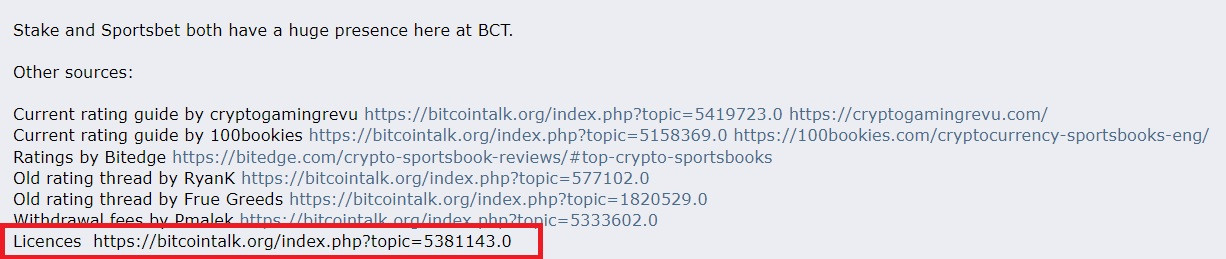 However, quoting the post or previewing it before a quote turns the last link into a clickable one as well. Screenshot below:  My question is, why is that? Why is the link in the original post not a hyperlink but if you quote the post it turns into one? @theymos what's an easy way around it without manually adding the hyperlink code? |
|
|
|
|
Seems that no one mentioned this here, so here it goes.
To mark this sad day of Trezor joining forces with Wasabi and Chainanalysis, the company has decided to offer a 15% discount on Trezor Model T purchases.
The price will be discounted from 19 - 26 April 2023. Instead of $219, the Trezor T now costs $186.
There is no need to enter any discount code. The new price automatically applies to all Trezor T orders.
|
|
|
|
Trezor warned its community about an ongoing phishing scam a few hours ago. According to the company's information, scammers contact users via SMS, email, and even phone. Potential victims are told that their Trezor Suite has been breached and is vulnerable. The scammers probably instruct users to download fake apps to steal their seeds and cryptocurrencies. - Don't fall for it because it's fake!
- If you are a Trezor user, don't click on unknown links and answer calls from unknown numbers. It's the oldest trick in the book. Trezor states they have no information about a data breach on their end. We should know more in the next few days if something bad has happened. 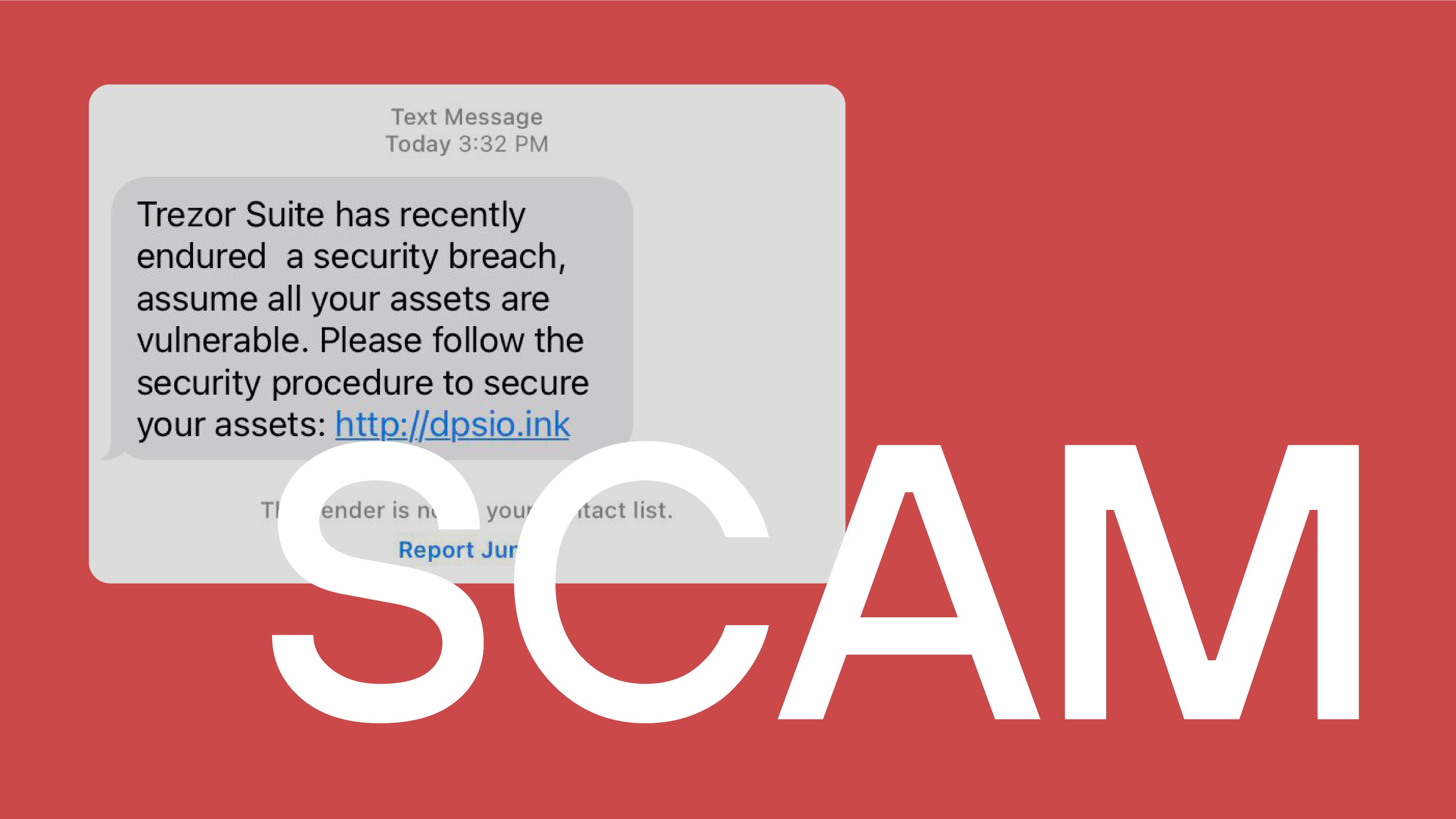 If you are a Trezor user, did you receive any emails, SMS, or calls from scammers? Source: https://twitter.com/Trezor/status/1630526933199998977 |
|
|
|
|
I have limited experience with using Bisq. I was the taker once to see how it works and completed the trade within the same day. I have two questions though.
- I could swear that the older versions of the software allowed peers to customize the sat/vByte fees they are paying. Now I don't see that anywhere in the options menu. You can only adjust the withdrawal fees when you move coins out of the Bisq wallet to another wallet. Is that possible or not? Seems excessive to overpay at times and use the suggested 20 sat/vByte, e.g. when 3-4 sat/vByte would almost guarantee next block confirmation when the mempools are almost empty.
- The next question is about what happens with the maker/taker fees if you shut down your laptop. For example, when you go to sleep at night. If you delete an order, you lose the maker/taker fees. If the order just goes offline when the software is no longer running, it will go back online again the next time you start it. I am guessing you don't lose any fees when you do that. The software has to remain online until the security deposits are confirmed on the blockchain. After that, it doesn't have to be online at all times.
|
|
|
|
|
I am just looking for information at this stage.
I should be getting some money either via Wise or Skrill in the near future for some work I did and still do for a client. Since I normally don't work with these e-wallet services, I am not going to withdraw the funds to my bank account/debit card. These are personal and verified accounts btw.
I am planning to use the money to buy BTC and USDT for it. Are there trusted members here who accept Wise and Skrill and who would be interested in 1:1 long-term deals perhaps? Escrow can, of course, be part of the deal, we just need to agree on the terms.
Post below please or send me a PM.
|
|
|
|
|
Bitcointalk is a bitcoin and crypto community that has been around for several years. During this time, the forum made history on many occasions, and we all had the chance to witness it.
No matter how or when you get here, Bitcointalk always offers a wide range of possibilities. I am sure that some have found friends and like-minded people on these boards. People have created partnerships that are respected to this day.
Bitcointalk members have used the forum to trade coins and collectibles and arranged face-to-face meetings. Some of you have attended bitcoin conferences and similar meetups with your forum buddies.
That makes me wonder: how many people from Bitcointalk do you know in real life? How many do you know by name because of your forum dealings and relationships? Have you ever wished you could meet someone from the forum, but it never happened? Can you call anyone from this community a friend, and why?
I know three users by real names. Unfortunately, they are inactive now and have disappeared from the forum. How about you?
|
|
|
|
|
I took advantage of the recent Black Friday deal and bought myself a Trezor One hardware wallet. I am planning to use it for certain activities in the future, and I have transferred a part of my bitcoin portfolio to it.
But I have noticed something strange working with the Trezor Suite. It doesn't recognize each click of the mouse for some reason. For example, when I enter my PIN code into the software, I often have to click on the numbers 2 or 3 times before Trezor Suite accepts them.
It's the same thing when I browse around the settings or perform other actions in the software. Multiple clicks are often needed. Otherwise, nothing happens.
The hardware device itself works perfectly fine. I have been and still am a Ledger user for years and have never experienced the same glitches in Ledger Live. Therefore, I can rule out any issues with my laptop's hardware or software.
I see no point in uninstalling and reinstalling Trezor Suite because I have never used an older version of it. It's the first time I have installed it on this machine.
Has anyone encountered something similar, and how did you fix it? I will get in touch with Trezor support unless I find out what is wrong. Also, there are no problems with my mouse because it works correctly with other apps.
|
|
|
|
|


 Show Posts