 Show Posts Show Posts
|
|
Pages: [1] 2 3 4
|
|
T21 stock firmware errors out on APW12, so you would need aftermarket firmware to run after swapping PSU from APW11 to APW12. For the fully assembled 'T21 transformer' we just ship with vnish on stock AMLOGIC control board. We have tested this build with both ePIC UMC and MARA UCB and it works with both, but they do add some additional cost to the build.
Both these CB options are nice since they have zero dev fees , so will likely pay themselves off over time.
But if you're looking to save on upfront cost, you can just flash luxos or vnish on the stock AML CB and it works fine.
Now if your T21 came with a CV1835 control board, that changes the math, since there is very few firmware option available. In this case, your best bet is to just remove the stock CB and replace with epic or MARA.
|
|
|
|
|
Just shipped you a couple of complimentary T21 Transformer PSU covers.
The bars aren't a shock risk but still pose short circuit risk.
|
|
|
|
|
Happy to see folks trying to get T21 to work on single phase. We've done this on a couple of test rigs and can't really tell a performance/efficiency difference between T21 and S21.
Yet the T21 is considerably cheaper, and comes with a Bigger PSU.
One issue I've encountered is that after you change the PSU and power bars, there doesn't seem to be an easy way to cover the power bars etc, since T21 does not come with a PSU cover piece.
|
|
|
|
|
Really excited about this product. It makes it much easier to setup and expand, standalone USB mining setups.
|
|
|
|
|
So, I'd like to post an update on this S19j Pro+ situation.
We were initially skeptical of the soldered heatsinks that are very similar to those on Antminer S17 series.
Call it a case of once bitten twice shy.
We've run many of these S19j Pro+ units in the mine through this summer, including some with substantial overclocking of upto 135T.
The soldered heatsinks seems to be doing a much better job of heat dissipation and S19j Pro+ miners consistently ran about 5-10 deg C cooler than other S19 series miner in the mine.
No, hashboard issues this summer either. While this is with just a few months of testing, I'd say its safe to assume that whatever issues Bitmain had with soldered heatsinks on S17 have now been fixed with S19j Pro+.
Someone mentioned it was improper chip tinning which caused issues with S17 series and not the soldering itself, so it's possible that Bitmain has improved its chip tinning process.
|
|
|
|
I saw the same issue when trying to run 8 Compac f with two R909s. This wasn't because of CPU overload, since CPU usage was only at 30% (12th gen core i5 with windows 10 PC). This computer can run 50+ compac f and upto 9 R909 without a problem. The devices run fine individually but the problem only occurs when running them together in the same cgminer window. I tried running two seperate cgminer instances on the same computer, one each for R909 and compac f and that seems to fix the unstable hashrate issues. I used & to enable only one type of device in each cgminer window. I'm not sure why this works, but I'd suggest trying this out. |
|
|
|
Just to close the loop on this issue with abnormal hashrate in LPM on JPro+, bitmain released an updated firmware a few days ago that fixes this issue. 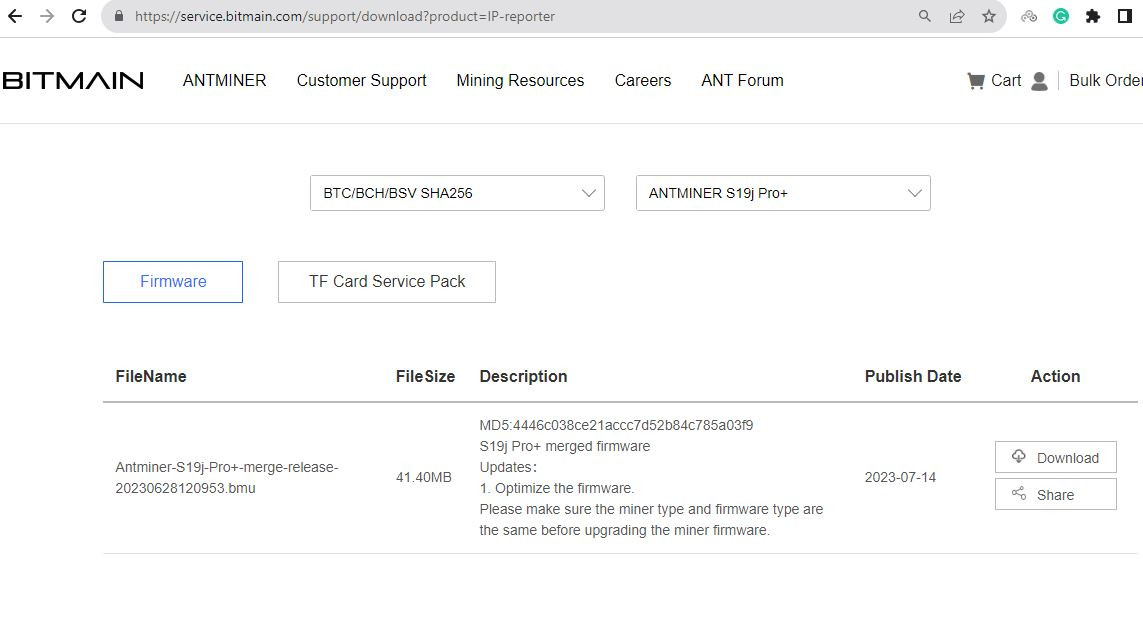 |
|
|
|
Well, in your green circle the 01 means one chip and the + means it's using ASIC Boost.
Most of this is explained in this thread and/or in Kano's support page.
Thanks for answering the green circle. I've looked through both kano's readme files and various gekkoscience threads but couldn't figure out what the other 3 that I've marked are. Would be great if someone can point me in the right direction. I'm compiling this information to make a neat infographic that explains everything on the gekko cgminer terminal for future users. |
|
|
|
Can someone help me understand what the highlighted parts on this cgminer terminal mean? I read through the cgminer readme file, but I think these are device specific fields, so not listed there. 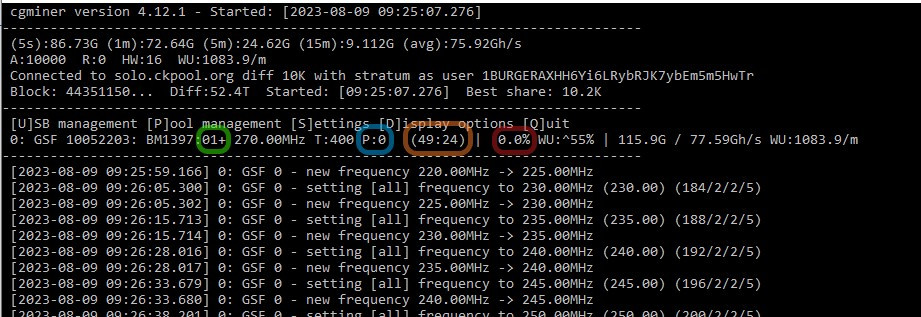 |
|
|
|
|
Should'nt be a problem.
AFAIK BitcoinMerch's MarsLander is using a pi zero 2.
|
|
|
|
Noticed the same issue on my S19jPro+ 120T with AMLOGIC CB Runs fine on full power but abnormal hashrate of 82-88T in Low power mode. 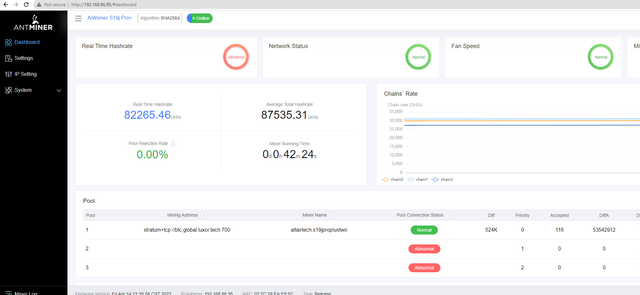 Switched to Xilinx CB on the same miner and everything works great. 🎉 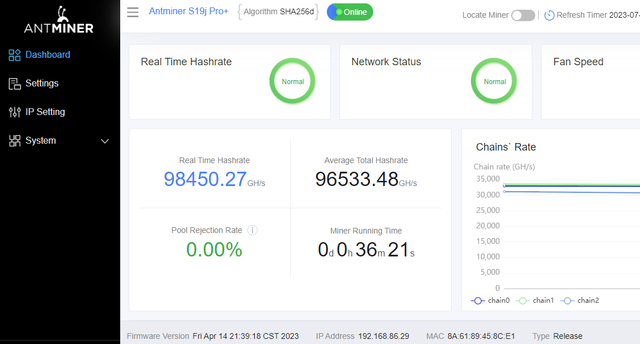 Runs well on ePIC UMC as well. This has to be either a problem with AMLOGIC hardware or Bitmain's AMLOGIC firmware. Unfortunately, AMLOGIC is the predominant control board on these miners these days, so this affects a lot of people. Hopefully bitmain can fix this with a firmware update 🤞 PS: 'The Menace' and 'The GOAT' are living up to their nicknames! 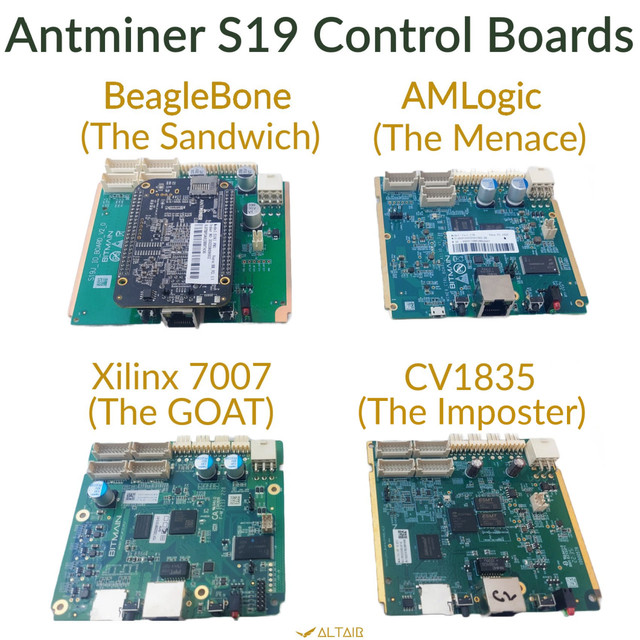 |
|
|
|
 ePIC Universal Mining Control boards for Antminer S19are now in stock! 💸 Zero dev fees! ⛏️ Compatible with S19j Pro & S19XP 🤖 Hashrate targeting & perpetual tuning ⚙️ Highly customizable PowerPlay firmware with independent control of clock frequency, core voltage & cooling parameters 💻Rich API for custom features 🖧 Compatible with fleet management software 💾 Regular firmware updates 🇨🇦 Designed in Canada 🚚 Same day shipping from Missouri, USA 🌎 Worldwide shipping 🏷️ Discount for #BTC payments 🛡️ 14-day full return/refund warranty ℹ️ user support group: https://t.me/epic_umcGet yours today 👇 |
|
|
|
Hi Patrike, Can you please add Awesome miner support for ePIC UMC firmware? This is a new hardware vendor that has an expanding enterprise and retail customer base. Would be happy to connect you with one of their engineers. They just finished integration with foreman. |
|
|
|
|
That is an extremely high clock setting and unless you have special cooling (water , liquid nitrogen etc) you won't be able to run the USB stick at that setting.
If you do have sufficient cooling, most USB hubs will not be able to provide sufficient power to hold that frequency.
IMHO these devices should stay under 600Mhz for most use cases.
|
|
|
|
Difficulty is projected to adjust downward next week, despite the recent BTC price hike. Sounds like it's curtailment season. Must be getting hot in Texas.   |
|
|
|
There was some debate about whether the heatsinks on jPro+ were glued on like S9 or soldered on like S17. Someone took apart a heatsink and it's clearly soldered.   |
|
|
|
Someone recently shared pictures of heatsinks on the newly released Antminer S19j Pro+. There's a separate heatsink for each chip here, instead of the large integrated bolt-on heatsink on other S19 models. Does this look like we're back to S9 style, or did Bitmain go back to the notoriously unreliable S17 style heatsinks again?   |
|
|
|
|



