Jonet
Jr. Member

 Offline Offline
Activity: 82
Merit: 3

|
 |
May 16, 2021, 09:53:09 AM |
|
I got the weirdest issue I can mine etc, zcash perfectly fine on my GPU, I cannot mine ETH ever since the dag increase, this 580 8gb gpu been having issues. it's a chinese brand, so i'm guessing either something is messed with kernel or something, it mined like a champ on eth, never turns off, but now it's giving me so many headaches 2021.05.16:02:02:30.141: main Phoenix Miner 5.6d Windows/msvc - Release build
2021.05.16:02:02:31.299: main OpenCL driver version: 17.8-BETA
Update you driver. If in doubt, read the first page. |
|
|
|
|
|
|
Advertised sites are not endorsed by the Bitcoin Forum. They may be unsafe, untrustworthy, or illegal in your jurisdiction.
|
|
|
|
|
snappleapple100
Newbie
Offline
Activity: 9
Merit: 0
|
|
May 16, 2021, 11:35:58 AM |
|
im noticing on phoenix miner 5.6d alot more stale shares then using previous 5.5c any body else see a increase im using nvidia cards
|
|
|
|
|
kazmok
Newbie
Offline
Activity: 8
Merit: 0
|
|
May 16, 2021, 04:13:47 PM |
|
I got the weirdest issue I can mine etc, zcash perfectly fine on my GPU, I cannot mine ETH ever since the dag increase, this 580 8gb gpu been having issues. it's a chinese brand, so i'm guessing either something is messed with kernel or something, it mined like a champ on eth, never turns off, but now it's giving me so many headaches 2021.05.16:02:02:30.141: main Phoenix Miner 5.6d Windows/msvc - Release build
2021.05.16:02:02:31.299: main OpenCL driver version: 17.8-BETA
Update you driver. If in doubt, read the first page. not a driver issue since i mine fine with etc, i tried linux as well. GPU crashes, trying to play with commands to lower the dag size and see if I can prevent my GPU from crashing -rvram -1 -clNew 0 -mi 10 -clf 2 -lidag 3 -pool ssl://eu1.ethermine.org:5555 -pool2 ssl://us1.ethermine.org:5555 -wal 0x7D6CE0Bb95EB8a1be6983BDf2A0AD81672a7C50e.E4 -cdm 0 -amd -daglim 1 -fanmax 85 -tt 60 |
|
|
|
|
peshakalmani
Newbie
Offline
Activity: 2
Merit: 0
|
|
May 16, 2021, 11:35:50 PM |
|
im noticing on phoenix miner 5.6d alot more stale shares then using previous 5.5c any body else see a increase im using nvidia cards
This happened to me after activating a new feature in windows. it was on SYSTEM: Monitor (first item on top)- graphicsettings (the last one)- hardwarebased GPU (?). Dont turn this on. Turn OFF. |
|
|
|
|
snappleapple100
Newbie
Offline
Activity: 9
Merit: 0
|
|
May 17, 2021, 02:15:48 AM
Last edit: May 17, 2021, 02:27:35 AM by snappleapple100 |
|
a feature in window it self or you mean new windows feature in 5.6d script?
right now at 11527 / 0 / 0 just 20 stalesp
|
|
|
|
|
xandry
Staff
Legendary
 Offline
Activity: 3444
Merit: 4050
Crypto Swap Exchange

|
|
May 17, 2021, 07:36:28 AM |
|
is it possible to mine dogecoin with Phoenixminer? Any guide to set it up correctly?
No, Phoenixminer does not support scrypt-algorithm. Just some article from search results: A Beginner’s Guide to Dogecoin Mining |
|
|
|
BunnyHunter
Newbie
Offline
Activity: 4
Merit: 0
|
|
May 17, 2021, 07:40:27 AM
Last edit: May 17, 2021, 08:05:57 AM by BunnyHunter |
|
Hi everybody, Since last week I had several messages "GPU1 DevFee: Incorrect ETH share from GPU1." with my 5.5c version So I decided to go to 5.6d version from this site. But this version didn't work correct with my MSI Afterburner settings, which worked perfect before with 5.5c: I had to increase mV and lower Core clock MHz. In other words, I had to lower my efficiency and had to increase my power consumption. Anyone sees that behavior too? Any way to improve it? Here some info from my 5.6d log: GPU1: NVIDIA GeForce RTX 2070 Super (pcie 1), CUDA cap. 7.5, 8 GB VRAM, 40 CUs
GPU1: 58C 117W
GPUs power: 116.7 W; 347 kH/J
Current -gt 15
Eth: Accepted shares 41 (0 stales), rejected shares 0 (0 stales)
Eth: Incorrect shares 0 (0.00%), est. stales percentage 0.00%
Eth: Maximum difficulty of found share: 153.9 GH (!)
Eth: Average speed (5 min): 40.488 MH/s
Eth: Effective speed: 48.81 MH/s; at pool: 48.81 MH/s Can someone please explain why my average speed is only 40MH/s compared to the effective speed of 48 MH/s? Which CUDA Version should I use? Thank you in advance. |
|
|
|
|
c_s_t
Newbie
Offline
Activity: 2
Merit: 0
|
|
May 17, 2021, 07:58:03 AM |
|
Hi, Since swapping my two graphics cards round pheonixminer thinks there are two 6900 xt cards (there is only one).
Phoenix Miner 5.6d Windows/msvc - Release build
-----------------------------------------------
CUDA version: 11.0, CUDA runtime: 8.0
OpenCL driver version: 21.4.1
Available GPUs for mining:
GPU1: GeForce GTX 1060 6GB (pcie 4), CUDA cap. 6.1, 6 GB VRAM, 10 CUs
GPU2: AMD Radeon RX 6900 XT (pcie 10), OpenCL 2.0, 16 GB VRAM, 80 CUs
GPU3: AMD Radeon RX 6900 XT (pcie 10), OpenCL 2.0, 16 GB VRAM, 80 CUs
I have tried uninstalling & reinstalling the drivers, run DDU in safe mode to clean the drivers, run a registry cleaner and removed hidden items in device manager. All other utilities show only one 6900 XT (e.g. GPUz). Any ideas where phoenixminer is getting two cards from? Thanks |
|
|
|
|
soda37
Jr. Member
Offline
Activity: 63
Merit: 1
|
|
May 17, 2021, 12:36:20 PM |
|
@PhoenixMiner,
is there any way to restart a rig if less than N GPUs detected? If there is no such a feature yet, will be nice to have. My problem is that sometimes after rig restart there is only 5 out of 6 gpu detected and I need to restart one more time again to make it work
|
|
|
|
|
batsonxl
Member
Offline
Activity: 1196
Merit: 26
|
@PhoenixMiner,
is there any way to restart a rig if less than N GPUs detected? If there is no such a feature yet, will be nice to have. My problem is that sometimes after rig restart there is only 5 out of 6 gpu detected and I need to restart one more time again to make it work
you can add this -minRigSpeed. If your rig less than speed it will restart |
|
|
|
|
xsoft
Newbie
Offline
Activity: 60
Merit: 0
|
|
May 18, 2021, 11:52:26 AM |
|
Radeon RX 6700 XT 12272 MB (113-67XA6SSB1-D01) 6700xt still have 0mh on 5.6d. (5.5c is working fine). Linux, 5.4.0-hiveos #108 · H 0.6-203 · A 20.40 (drivers) |
|
|
|
|
Kolegata
Newbie
Offline
Activity: 2
Merit: 0
|
|
May 18, 2021, 04:41:28 PM |
|
Yes. with 6800 not working too.........maybe they are not interested to take fee from us, we just pay then to Russians......Gminer works stable
|
|
|
|
|
|
Iamtutut
|
|
May 18, 2021, 05:05:20 PM |
|
Just updated to the lastest version (5.6d), with a 5600XT.
Mining for slightly over 3 hours.
Consistent 42MH/s miner side, couldn't reach this speed with the same settings with 5.2e.
Pool side: 38-38,1MH/s (NH)
Stales: 4/1122
Errors: 0
GPU wattage according to the driver: 106W. Dunno if it's a bug, couldn't get the GPU running @800mV before (Win 10), always stuck @900mV minimum. Power draw was always 120-125W before.
Will see if this jkeeps going on.
|
|
|
|
|
Owl182
Newbie
Offline
Activity: 7
Merit: 0
|
|
May 19, 2021, 05:47:51 AM |
|
Good morning all  I'm a complete noob so please bear with me  Thanks you for this very comprehensive post, useful and informative !! I am curious about something though, for example once i edit the batch file and get the miner running successfully with my wallet address etc, am i able to monitor what it is mining and also what is the payout threshold ? i have EthOS on one of my drives and although it sees the GPU it does not recognise it and gives a hardware error "drivers not loaded" i'm not overly concerned about EthOS at the moment though and will probably use it on different cards or something Phoenix Miner seems to be one of the few i have been able to get running properly and is more "forgiving" than some of the others i have looked at although most seem to work in the same fashion Anyway, i'm enjoying mining and working with the software and hardware, beats collecting stamps as a hobby lol |
|
|
|
|
soda37
Jr. Member
Offline
Activity: 63
Merit: 1
|
|
May 19, 2021, 08:28:30 AM |
|
@PhoenixMiner,
is there any way to restart a rig if less than N GPUs detected? If there is no such a feature yet, will be nice to have. My problem is that sometimes after rig restart there is only 5 out of 6 gpu detected and I need to restart one more time again to make it work
you can add this -minRigSpeed. If your rig less than speed it will restart I'm aware of this option, but it's not a feasible solution. If less than 6 cards detected, it means miner will continuously try to apply wrong voltage and overclock setting to another card. I consider this as a dangerous, moreover it will take more than 5 min to restart while feature to detect lack of required number of GPUs would help to reboot the rig right away. |
|
|
|
|
xandry
Staff
Legendary
Offline
Activity: 3444
Merit: 4050
Crypto Swap Exchange
|
|
May 19, 2021, 10:53:47 AM |
|
I am curious about something though, for example once i edit the batch file and get the miner running successfully with my wallet address etc, am i able to monitor what it is mining and also what is the payout threshold ?
Yes, you will see something like that: 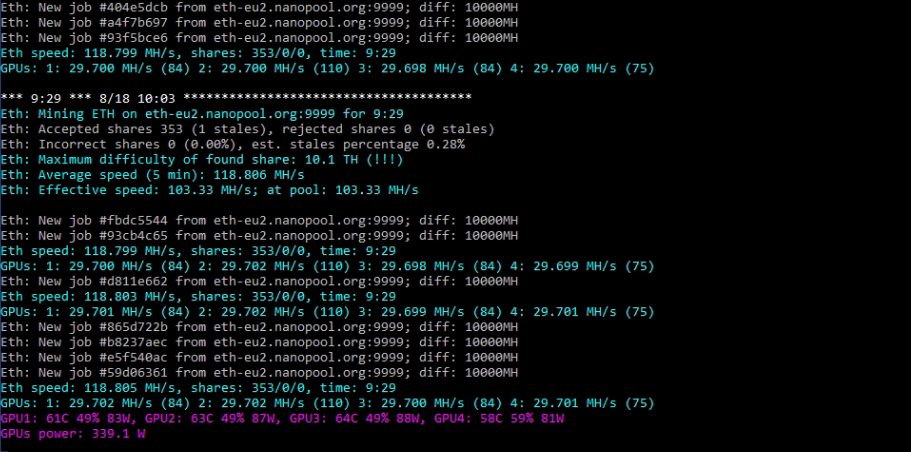 (The image from duckduckgo search results.) (The image from duckduckgo search results.)And you can monitor payouts directly on your wallet, on a pool, or through blockchain explorer. |
|
|
|
Owl182
Newbie
Offline
Activity: 7
Merit: 0
|
|
May 19, 2021, 11:16:14 AM |
|
Hi Xandry, Thank you very much for your reply |
|
|
|
|
Owl182
Newbie
Offline
Activity: 7
Merit: 0
|
|
May 19, 2021, 11:42:08 AM |
|
Hi, Apologies, another question, the rig name, can it be anything or is it specific in some way, or allocated by the pool your using, so in other words first create a login for the pool of choice ? Thank you |
|
|
|
|
|
Vann
|
|
May 19, 2021, 11:55:13 AM
Last edit: May 19, 2021, 12:07:17 PM by Vann Merited by vapourminer (1), xandry (1) |
|
The worker name is just for you to keep track of your rigs, so you know which one is being reported on the pool. Most ETH pools don't require an account. You can do all the configuration in the bat file and start mining. Some pools will require you to set up an account with a username/password and worker names which you then use in the miner configuration. Every pool has a 'getting started' page with the server addresses, port numbers and setup needed to start mining on the pool.
|
|
|
|
|
Owl182
Newbie
Offline
Activity: 7
Merit: 0
|
|
May 19, 2021, 12:09:10 PM |
|
Hi Vann, Appreciate the reply, i suspected as much but wasn't sure, will be running the "new" settings on 5.6d later on after work, will surely ask if i run into unexpected problems |
|
|
|
|
|



