tonych (OP)
Legendary

 Offline Offline
Activity: 964
Merit: 1008


|
 |
February 27, 2023, 08:59:51 AM |
|
|
Simplicity is beauty
|
|
|
|
|
|
"There should not be any signed int. If you've found a signed int
somewhere, please tell me (within the next 25 years please) and I'll
change it to unsigned int." -- Satoshi
|
|
|
Advertised sites are not endorsed by the Bitcoin Forum. They may be unsafe, untrustworthy, or illegal in your jurisdiction.
|
|
|
|
|
|
|
tonych (OP)
Legendary
Offline
Activity: 964
Merit: 1008
|
|
April 11, 2023, 05:53:05 PM |
|
The initial sale has completed and the OSWAP token started trading. 14,457.88 GBYTE sent to buy OSWAP tokens 935.3 OSWAP tokens issued 238.9 GBYTE is the initial trading price of OSWAP token 15.46 GBYTE is the price per OSWAP token paid by the initial sale participants 223,443 GBYTE is the initial market cap of OSWAP tokens (all are locked for 4 years) The initial sale participants can claim their OSWAP tokens from Governance / Stake & vote https://token.oswap.io/governance/shares/stakeFarming APYs at https://token.oswap.io/farming/all are currently over 10,000% in some pools. |
Simplicity is beauty
|
|
|
|
|
|
altcoinb
|
|
June 02, 2023, 11:20:52 AM
Last edit: June 05, 2023, 09:32:31 PM by altcoinb |
|
|
|
|
|
|
tonych (OP)
Legendary
Offline
Activity: 964
Merit: 1008
|
|
June 13, 2023, 05:48:41 PM |
|
We are finally launching contracts with arbitration. They are smart contracts for arbitrary business transactions. They make all transactions safer by protecting the parties using decentralized escrow, plus an arbiter invoked in case of a dispute. This is especially important for international trade where the parties are currently the least protected when they don't know each other. That's a $32t market. Full story: https://blog.obyte.org/making-p2p-great-again-episode-v-contracts-with-arbitration-78644de74382Website: https://arbstore.orgAnd we are looking for more arbiters. Get in touch if you think you are qualified to resolve disputes in a particular field, or you know such people.  |
Simplicity is beauty
|
|
|
tonych (OP)
Legendary
Offline
Activity: 964
Merit: 1008
|
|
August 21, 2023, 09:08:45 AM |
|
We have joined the Kava Rise program to give our users an opportunity to earn income on their GBYTE and other crypto holdings. Two our dapps are enrolled into Kava Rise: Counterstake and the new LINE token. The Kava Rise program rewards for the TVL these dapps create on the Kava network, and we will distribute 90% of the rewards (after converting them to GBYTE) among users who actually create the TVL. The APY is around 7%, and LINE token earns double of that by contributing to the TVL twice. LINE is a price-protected token that one can borrow on Kava for GBYTE collateral. Price protection means that if its price falls, one can repay the loan and get one's collateral back (less fees). To take advantage of the program: - bridge GBYTE from Obyte to Kava via Counterstake - use GBYTE to borrow LINE at linetoken.org - bridge the borrowed LINE tokens back to Obyte - just keep them in your Obyte wallet and the rewards will be sent to your wallet address monthly Track the rewards at https://kava.obyte.org/LINE token: https://linetoken.org/Full announcement: https://blog.obyte.org/kava-rise-to-benefit-obyte-users-through-the-new-price-protected-line-token-20e0dd390780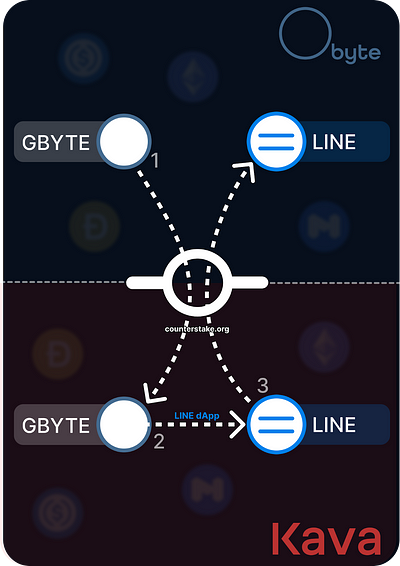 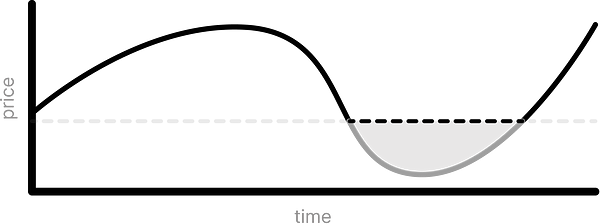 |
Simplicity is beauty
|
|
|
|
Eddyc
|
|
September 09, 2023, 12:00:18 AM |
|
|
|
|
|
|
Buchi-88
Legendary
Offline
Activity: 3780
Merit: 2496
|
|
November 21, 2023, 01:05:02 PM |
|
If everyone hasn't heard, Bittrex will be closing its doors and all trading activities will be disabled on 4 December. Here is the official Twitter (X) message. It is with great regret that we inform you that Bittrex Global has decided to wind down its operations. Effective Monday 4 December 2023, all trading activity on Bittrex Global will be disabled. After that date, customers will only be able to withdraw assets as part of the winding down process. All our customers are strongly encouraged to log into their account and withdraw assets as soon as possible. All funds and tokens remain safe and secure on the Bittrex Global platform, and are available for withdrawal – in accordance with applicable law and our Terms of Service – at any time. Please see our full statement here. https://bit.ly/3MxBlkBTherefore, Obyte should look for a new exchange and all those who still have Obytes on Bittrex should withdraw them as soon as possible. |
|
|
|
|
|
|
|
jwinterm
Legendary
Offline
Activity: 3010
Merit: 1103
|
|
February 27, 2024, 10:30:40 AM |
|
You guys are a scam. If simplicity is beauty then your distribution of coins is the ugliest most complex fucked up thing ever lol, and you can't build a solid foundation on a pile of shit.
|
|
|
|
|
tonych (OP)
Legendary
Offline
Activity: 964
Merit: 1008
|
|
February 27, 2024, 11:55:50 AM |
|
You guys are a scam. If simplicity is beauty then your distribution of coins is the ugliest most complex fucked up thing ever lol, and you can't build a solid foundation on a pile of shit.
We made a lot of mistakes in the distribution indeed, and were often late to correct them. However, for me, distribution never was a big part of what Obyte is. It is a network first and foremost. |
Simplicity is beauty
|
|
|
|
|
drays
Legendary
Offline
Activity: 2520
Merit: 1073
|
|
March 10, 2024, 02:56:11 PM |
|
GBYTE has been listed on the NonKyc.io exchange
That exchange seems to be focused on privacy (well, at least they claim to be). Is there any chance they would list blackbytes? |
... this space is not for rent ... |
|
|
tonych (OP)
Legendary
Offline
Activity: 964
Merit: 1008
|
|
March 10, 2024, 03:41:18 PM |
|
GBYTE has been listed on the NonKyc.io exchange
That exchange seems to be focused on privacy (well, at least they claim to be). Is there any chance they would list blackbytes? I don't think so. Sending blackbytes to the exchange would defeat their privacy as the history would be disclosed to the exchange. Even if there are users who are okay with this, sending blackbytes can only happen in private chat between sender and recipient. No other coin works this way and the exchange would be unprepared to accept deposits and send out withdrawals in this manner. |
Simplicity is beauty
|
|
|
|



