megabytesmining
Newbie

 Offline Offline
Activity: 1
Merit: 0

|
 |
January 02, 2021, 09:13:50 PM
Last edit: January 04, 2021, 09:32:54 PM by megabytesmining |
|
Apparently not so friendly with 12 gpu rig, sometimes on 10 gpu. Nothing on a 8 gpu rig or a 14 gpu rig.
Upgraded from to 5.4, gpu 6 will get random rejected shares.
Tried to see if hive was the issue, downgraded, same problem on 5.4
Downgraded to 5.3b, so far no rejects.
I mixed cards/risers. Same problem always on gpu 6 in phoenix miner.
I did try to adjust oc and what not, but no difference.
All gpus are amd msi 5600xt.
Not sure what other info to post.
EDIT:
Damn , a reject. Most likely a disregard.
EDIT2: no progress, swapped everything except mobo.
|
|
|
|
|
|
majsta
|
|
January 02, 2021, 09:51:49 PM
Last edit: January 02, 2021, 10:11:14 PM by majsta |
|
I m having strange issues with one my mining machine with PhoenixMiner running on Win10. On other machines I have this does not exist as a problem. No matter what I try regarding running miner in admin mode, changing drivers or whatever else it reports like this: 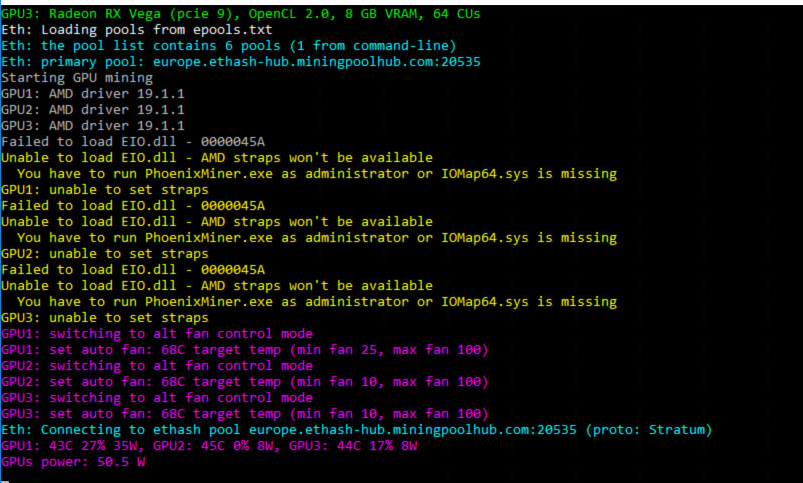 |
|
|
|
|
miner29
|
|
January 02, 2021, 10:31:52 PM |
|
I m having strange issues with one my mining machine with PhoenixMiner running on Win10. On other machines I have this does not exist as a problem. No matter what I try regarding running miner in admin mode, changing drivers or whatever else it reports like this: Copy the dll its missing from one of your other machines not having this issue. It was left out of a build on one version i beleive. |
|
|
|
|
UselessGuru
Jr. Member
Offline
Activity: 200
Merit: 3
|
|
January 02, 2021, 10:38:21 PM |
|
Command line used: PhoenixMiner.exe -amd -eres 0 -mi 12 -dcoin blake2s -pool us-east.ethash-hub.miningpoolhub.com:20535 -wal ################.#### -pass x -proto 4 -dpool BLAKE2S.eu.nicehash.com:3361 -dwal #############.####### -dpass x -log 0 -wdog 0 -cdmport 4001 -gpus 2 This is Windows 10, mixed rig with AMD & NVIDIA cards installed, Amd driver version 3110.7 (OpenCL driver version: 20.7-10/20.11.1) No matter what value I set for -SCI PM always goes into auto-tuning and never reports any Blake2s hash rate. This issue seems to be related to the DAG epoch, because I was able to run the excat same command at lower epochs. Dual mining on Nvidia still works. Can anyone reproduce? Posted earlier this week, same issue with my amd cards. I have not received any response yet. Happened as soon as the epoch changed to 385. https://bitcointalk.org/index.php?topic=2647654.msg55976270#msg55976270No an 8gb card wont help 4gb cards unless you replace all the 4gb cards with 8gb. Try lolminer ..but honestly windows is about done as far as 4gb cards. Linux has a few more weeks but it too will succumb. If you are having issues with hiveos sounds like you got a card or cards with issues. Watch you rig if you see a card slowing down or failing remove it and try without it..if the others work fine you may have a card issue...or riser issue...etc... My card is a Rx580 8GB |
Co-developer of www.nemosminer.com (http://www.nemosminer.com)
|
|
|
|
miner29
|
|
January 02, 2021, 10:50:57 PM |
|
Command line used: PhoenixMiner.exe -amd -eres 0 -mi 12 -dcoin blake2s -pool us-east.ethash-hub.miningpoolhub.com:20535 -wal ################.#### -pass x -proto 4 -dpool BLAKE2S.eu.nicehash.com:3361 -dwal #############.####### -dpass x -log 0 -wdog 0 -cdmport 4001 -gpus 2 This is Windows 10, mixed rig with AMD & NVIDIA cards installed, Amd driver version 3110.7 (OpenCL driver version: 20.7-10/20.11.1) No matter what value I set for -SCI PM always goes into auto-tuning and never reports any Blake2s hash rate. This issue seems to be related to the DAG epoch, because I was able to run the excat same command at lower epochs. Dual mining on Nvidia still works. Can anyone reproduce? Posted earlier this week, same issue with my amd cards. I have not received any response yet. Happened as soon as the epoch changed to 385. https://bitcointalk.org/index.php?topic=2647654.msg55976270#msg55976270No an 8gb card wont help 4gb cards unless you replace all the 4gb cards with 8gb. Try lolminer ..but honestly windows is about done as far as 4gb cards. Linux has a few more weeks but it too will succumb. If you are having issues with hiveos sounds like you got a card or cards with issues. Watch you rig if you see a card slowing down or failing remove it and try without it..if the others work fine you may have a card issue...or riser issue...etc... My card is a Rx580 8GB I was answering sobertram. |
|
|
|
|
ollis miner
Newbie
Offline
Activity: 30
Merit: 0
|
|
January 02, 2021, 10:52:23 PM |
|
Hi guys,
Have been mining with Claymore since 2017 and are now trying out Phoenix on my rigs. Get some weird hashrates on my Vega's...
Tried to find similar problems on the forum, but no luck. Anyone?
*** 3:31 *** 1/2 23:45 **************************************
Eth: Mining ETH on ssl://eu1.ethermine.org:5555 for 3:31
Eth: Accepted shares 490 (1 stales), rejected shares 0 (0 stales)
Eth: Incorrect shares 0 (0.00%), est. stales percentage 0.20%
Eth: Maximum difficulty of found share: 1385.8 GH (!)
Eth: Average speed (5 min): 4160166.742 MH/s
Eth: Effective speed: 154.57 MH/s; at pool: 154.57 MH/s
Eth speed: 4419158.956 MH/s, shares: 490/0/0, time: 3:31
GPUs: 1: 31.324 MH/s (97) 2: 30.922 MH/s (97) 3: 44.832 MH/s (140) 4: 2989339.460 MH/s (4) 5: 1429667.553 MH/s (11) 6: 44.865 MH/s (141)
Eth: New job #8d6e5971 from ssl://eu1.ethermine.org:5555; diff: 4000MH
Eth speed: 4408225.082 MH/s, shares: 490/0/0, time: 3:31
GPUs: 1: 31.330 MH/s (97) 2: 30.922 MH/s (97) 3: 44.839 MH/s (140) 4: 2895382.883 MH/s (4) 5: 1512690.251 MH/s (11) 6: 44.858 MH/s (141)
Eth: New job #302c324d from ssl://eu1.ethermine.org:5555; diff: 4000MH
Eth speed: 4149993.722 MH/s, shares: 490/0/0, time: 3:31
GPUs: 1: 31.277 MH/s (97) 2: 30.900 MH/s (97) 3: 45.006 MH/s (140) 4: 2622688.828 MH/s (4) 5: 1527152.810 MH/s (11) 6: 44.901 MH/s (141)
|
|
|
|
|
soda37
Jr. Member
Offline
Activity: 63
Merit: 1
|
|
January 02, 2021, 10:59:13 PM |
|
Hi guys,
Have been mining with Claymore since 2017 and are now trying out Phoenix on my rigs. Get some weird hashrates on my Vega's...
Tried to find similar problems on the forum, but no luck. Anyone?
*** 3:31 *** 1/2 23:45 **************************************
Eth: Mining ETH on ssl://eu1.ethermine.org:5555 for 3:31
Eth: Accepted shares 490 (1 stales), rejected shares 0 (0 stales)
Eth: Incorrect shares 0 (0.00%), est. stales percentage 0.20%
Eth: Maximum difficulty of found share: 1385.8 GH (!)
Eth: Average speed (5 min): 4160166.742 MH/s
Eth: Effective speed: 154.57 MH/s; at pool: 154.57 MH/s
Eth speed: 4419158.956 MH/s, shares: 490/0/0, time: 3:31
GPUs: 1: 31.324 MH/s (97) 2: 30.922 MH/s (97) 3: 44.832 MH/s (140) 4: 2989339.460 MH/s (4) 5: 1429667.553 MH/s (11) 6: 44.865 MH/s (141)
Eth: New job #8d6e5971 from ssl://eu1.ethermine.org:5555; diff: 4000MH
Eth speed: 4408225.082 MH/s, shares: 490/0/0, time: 3:31
GPUs: 1: 31.330 MH/s (97) 2: 30.922 MH/s (97) 3: 44.839 MH/s (140) 4: 2895382.883 MH/s (4) 5: 1512690.251 MH/s (11) 6: 44.858 MH/s (141)
Eth: New job #302c324d from ssl://eu1.ethermine.org:5555; diff: 4000MH
Eth speed: 4149993.722 MH/s, shares: 490/0/0, time: 3:31
GPUs: 1: 31.277 MH/s (97) 2: 30.900 MH/s (97) 3: 45.006 MH/s (140) 4: 2622688.828 MH/s (4) 5: 1527152.810 MH/s (11) 6: 44.901 MH/s (141)
Yup, I've seen this on my rigs. Actually, it's not Phoenix miner problem, I've seen this with TRM as well. This happens when you overlock too hard your cards and they can't sustain. Just lower OC. |
|
|
|
|
ollis miner
Newbie
Offline
Activity: 30
Merit: 0
|
|
January 02, 2021, 11:03:01 PM |
|
Hi guys,
Have been mining with Claymore since 2017 and are now trying out Phoenix on my rigs. Get some weird hashrates on my Vega's...
Tried to find similar problems on the forum, but no luck. Anyone?
*** 3:31 *** 1/2 23:45 **************************************
Eth: Mining ETH on ssl://eu1.ethermine.org:5555 for 3:31
Eth: Accepted shares 490 (1 stales), rejected shares 0 (0 stales)
Eth: Incorrect shares 0 (0.00%), est. stales percentage 0.20%
Eth: Maximum difficulty of found share: 1385.8 GH (!)
Eth: Average speed (5 min): 4160166.742 MH/s
Eth: Effective speed: 154.57 MH/s; at pool: 154.57 MH/s
Eth speed: 4419158.956 MH/s, shares: 490/0/0, time: 3:31
GPUs: 1: 31.324 MH/s (97) 2: 30.922 MH/s (97) 3: 44.832 MH/s (140) 4: 2989339.460 MH/s (4) 5: 1429667.553 MH/s (11) 6: 44.865 MH/s (141)
Eth: New job #8d6e5971 from ssl://eu1.ethermine.org:5555; diff: 4000MH
Eth speed: 4408225.082 MH/s, shares: 490/0/0, time: 3:31
GPUs: 1: 31.330 MH/s (97) 2: 30.922 MH/s (97) 3: 44.839 MH/s (140) 4: 2895382.883 MH/s (4) 5: 1512690.251 MH/s (11) 6: 44.858 MH/s (141)
Eth: New job #302c324d from ssl://eu1.ethermine.org:5555; diff: 4000MH
Eth speed: 4149993.722 MH/s, shares: 490/0/0, time: 3:31
GPUs: 1: 31.277 MH/s (97) 2: 30.900 MH/s (97) 3: 45.006 MH/s (140) 4: 2622688.828 MH/s (4) 5: 1527152.810 MH/s (11) 6: 44.901 MH/s (141)
Yup, I've seen this on my rigs. Actually, it's not Phoenix miner problem, I've seen this with TRM as well. This happens when you overlock too hard your cards and they can't sustain. Just lower OC. OK, thanks. Will adjust OC. Not promising performance so far with Phoenix compared to Claymore, but will surely give it a fair try. |
|
|
|
|
sobertram
Newbie
Offline
Activity: 12
Merit: 0
|
|
January 03, 2021, 02:33:38 AM |
|
No an 8gb card wont help 4gb cards unless you replace all the 4gb cards with 8gb.
Try lolminer ..but honestly windows is about done as far as 4gb cards. Linux has a few more weeks but it too will succumb.
If you are having issues with hiveos sounds like you got a card or cards with issues. Watch you rig if you see a card slowing down or failing remove it and try without it..if the others work fine you may have a card issue...or riser issue...etc...
My card is a Rx580 8GB I was answering sobertram. I just assumed you replied to the wrong thread because nothing that you said corresponds to anything discussed on this post or the one I linked. I should have been explicit that I have 8gb cards. This is not about ether mining but about the dual mining coin blake2s. I am mining main coin, eth, without any issues. |
|
|
|
|
Cryptoseekert
Newbie
Offline
Activity: 21
Merit: 1
|
|
January 03, 2021, 05:48:21 AM
Last edit: January 03, 2021, 06:27:19 AM by Cryptoseekert |
|
make sure you add full path to phoenixminer.exe to your bat file as admin console starts in System32 folder
[/quote]
thank you for your help. ill try that.
also sometimes if i do that, it ask me again if its ok to do it as administrator.
is there any way to do this automatically? so when the miner restarts it always execute the bat?
thanks again
edit: in theory i could also copy phoenixminer.exe to system32 right?
|
|
|
|
|
dumbcane
Newbie
Offline
Activity: 5
Merit: 0
|
|
January 03, 2021, 09:03:19 AM
Last edit: January 03, 2021, 12:32:52 PM by dumbcane |
|
I had a bunch of miners lock up trying to create dag #386. All RX5700XTs. Reboot fixed it. The rest, most of them threw an incorrect share. Did this happen to anyone else?
Ubuntu 18.04 with amdgpu-pro-20.20-1089974-ubuntu-18.04.
PhoenixMiner 5.4c
|
|
|
|
|
batsonxl
Member
Offline
Activity: 1197
Merit: 26
|
|
January 03, 2021, 12:15:17 PM |
|
I had a bunch of miners lock up trying to create dag #386. All RX5700XTs. Reboot fixed it. The rest, most of them threw an incorrect share. Did this happen to anyone else?
Ubuntu 18.04 with amdgpu-pro-20.20-1089974-ubuntu-18.04
Yep it happened on switching 386 epoch. rig restarted itself then all worked again.mine win10 By the way where is Mr.Phoenix? new year party continue? Still waiting straps for polaris cards,he said not before january |
|
|
|
|
dumbcane
Newbie
Offline
Activity: 5
Merit: 0
|
|
January 03, 2021, 01:12:36 PM |
|
I had a bunch of miners lock up trying to create dag #386. All RX5700XTs. Reboot fixed it. The rest, most of them threw an incorrect share. Did this happen to anyone else?
Ubuntu 18.04 with amdgpu-pro-20.20-1089974-ubuntu-18.04.
PhoenixMiner 5.4c
i think its because of the -gt value u have saved earlier, i may be wrong They were all set to auto tune. |
|
|
|
|
fr4nkthetank
Legendary
 Offline
Activity: 2294
Merit: 1182
Now the money is free, and so the people will be
|
|
January 03, 2021, 02:58:06 PM |
|
every dag change may cause trouble
|
|
|
|
|
feelnosorry
Newbie
Offline
Activity: 6
Merit: 1
|
|
January 03, 2021, 04:20:16 PM
Last edit: January 03, 2021, 05:12:36 PM by feelnosorry |
|
clSetKernelArg (-48)
Fatal error detected. Restarting
Does somebody have this error?
Windows 10 64
RX570 8GB
|
|
|
|
|
skuhlowlow
Newbie
Offline
Activity: 1
Merit: 0
|
|
January 03, 2021, 08:25:30 PM |
|
clSetKernelArg (-48)
Fatal error detected. Restarting
^^ same error on different linux distros for 8gb 570/580s. Had to switch miners
It mines with -clKernel 0 but I was getting a lot of stale shares.
|
|
|
|
|
|
Junkey
|
|
January 04, 2021, 02:31:44 AM |
|
I have two windows 10 machines with 5, rx580 8gb each. Using 5.4c with drivers 20.9.2. Getting only incorrect shares. It has been working for a few months. Anyone else have this issue?
Thanks,
|
|
|
|
|
doctorman
Newbie
Offline
Activity: 35
Merit: 0
|
|
January 04, 2021, 03:47:10 AM |
|
Regarding the RTX 3060 Nvidia 30x0 series issue
@PhoenixMiner would really appreciate a word from you on this issue
We need a way to set the memory clock Low (windows msi burner +950 or below) before each epoch or when we start/ Restart the miner for DAG creation, after we can increase it all the way to +1500
the is the difference of 59MHs to 64MHs , 5MHs difference which add up to 60MHs for a 12 GPU rig
I used the -lidag 3 but it did not help with the Restart of the miner
PLEASE PLEASE PLEASE give us a response on this.
Can you please add a feature to lower the memclock before each DAG and epoch and go back up after?
I can set the miner to RESTART after the epoch change messes it up using -minRigSpeed <58> but that will not fix the issue since it will restart the miner with high mem clock set in MSI.
is there a way to set MHs of the GPU to be watched instead of the whole rig? -minRigSpeed like -minGPUspeed ?
THANK YOU VERY MUCH!
|
|
|
|
|
waywoos
Jr. Member
Offline
Activity: 124
Merit: 2
|
|
January 04, 2021, 03:56:24 AM |
|
Regarding the RTX 3060 Nvidia 30x0 series issue
@PhoenixMiner would really appreciate a word from you on this issue
We need a way to set the memory clock Low (windows msi burner +950 or below) before each epoch or when we start/ Restart the miner for DAG creation, after we can increase it all the way to +1500
the is the difference of 59MHs to 64MHs , 5MHs difference which add up to 60MHs for a 12 GPU rig
I used the -lidag 3 but it did not help with the Restart of the miner
PLEASE PLEASE PLEASE give us a response on this.
Can you please add a feature to lower the memclock before each DAG and epoch and go back up after?
I can set the miner to RESTART after the epoch change messes it up using -minRigSpeed <58> but that will not fix the issue since it will restart the miner with high mem clock set in MSI.
is there a way to set MHs of the GPU to be watched instead of the whole rig? -minRigSpeed like -minGPUspeed ?
THANK YOU VERY MUCH!
let him enjoy his holidays. i have faith that we will hear from him again and will have some goodies for us soon. he always comes through. |
|
|
|
|
Deafran
Jr. Member
Offline
Activity: 49
Merit: 4
|
|
January 04, 2021, 05:57:47 AM |
|
I have two windows 10 machines with 5, rx580 8gb each. Using 5.4c with drivers 20.9.2. Getting only incorrect shares. It has been working for a few months. Anyone else have this issue?
Thanks,
sorry, ever try to lower your OC ? |
|
|
|
|
|



