|
coinzoid
|
 |
April 10, 2017, 10:38:03 AM |
|
Hi All,
Please help me, i 'm stuck.
Does anyone use this BIOS Anoraks_Sapphire RX 480 8GB Reference Samsung_memshift.rom100 (256 KB)
I flash my cards, but now they are very unstable.
With witch BIOS i can make 29+ Mh/s on my Sapphire Radeon RX 480 reference, and to have reasonable power consummation?
Witch driver I need to use. With 16.11.1 cards are unstable.
They hangs after 2 hours working.
I try to install the latest driver, but in this case, driver do not see cards.
Can you please share with me our setting for mem clock, voltage etc.
Thank you in advance
Please tell me exact model of your GPUs. For 11260-01-20g I've used Jukebox Low Power Bios and it hashes 29.3MH/s. Besides I'm using 16.11.5 version of AMD drivers. This version do not have a signature check so it detects gpus with custom bios. |
|
|
|
|
|
|
|
|
|
|
|
In order to get the maximum amount of activity points possible, you just need to post once per day on average. Skipping days is OK as long as you maintain the average.
|
|
|
Advertised sites are not endorsed by the Bitcoin Forum. They may be unsafe, untrustworthy, or illegal in your jurisdiction.
|
|
|
|
|
|
|
thespycry
Newbie

 Offline Offline
Activity: 42
Merit: 0

|
|
April 10, 2017, 03:54:01 PM |
|
when overwriting bios on the 11260-01-20g Sapphire Radeon NITRO RX 480 8GB GDDR5
in which position do you have the bios switch when copying the bios from the card?
thank you
|
|
|
|
|
usuksobad
Member
Offline
Activity: 107
Merit: 10
|
|
April 10, 2017, 04:31:15 PM |
|
Eliovp last post april 5 im starting to worry, anybody knows this guy contact details?
|
|
|
|
|
Eliovp (OP)
Legendary
 Offline
Activity: 1050
Merit: 1293
Huh?

|
|
April 10, 2017, 04:47:41 PM |
|
Eliovp last post april 5 im starting to worry, anybody knows this guy contact details?
Haha, thank you for your concern. I'm still alive and kicking. I just haven't had the time to read through all of the posts/threads. When i do, i will  Greetings! |
|
|
|
|
shadabahmed
|
|
April 11, 2017, 10:04:11 AM |
|
Eliovp last post april 5 im starting to worry, anybody knows this guy contact details?
Haha, thank you for your concern. I'm still alive and kicking. I just haven't had the time to read through all of the posts/threads. When i do, i will Greetings! do u have any mod for zec mining RX470 reffrence? |
Am I spamming? Report me!
|
|
|
mafiarob
Newbie
Offline
Activity: 9
Merit: 0
|
|
April 11, 2017, 07:44:01 PM |
|
Ok... after reading 56 pages of posts here now i'm am very very very confused. So if some good guy can help me I'll be very grateful. I start my first diy rig before few days ( https://bitcointalk.org/index.php?action=profile;u=979817;sa=showPosts ) and because i'm at the start i didn't touch GPUs bios or overclocking. So now i would like to push my system up. I want a stable system at max performances without the risk of burn my house (and the GPUs). I haven't problems with electricity. My system: GPUs: 3x Sapphire nitro+ 8GB rx480 oc (11260-01-20) OS: Windows 10 (64bit) GPUs drivers: 16.7.3 Mining software: Genoil claymore 9.0 Pool: ethermine.org & suprnova.cc (ETH+DCR) So how much MH/s can i have for every card for a stable and secure system (without electricity problem)? Please help me for how to mod Bios and how to overclock and tell me if i need to change drivers or mining software or pool. Thank you very much!!! https://ibb.co/nwaYtvhttps://ibb.co/eKYiT5Eliovp pleeeeeease help me!!! |
|
|
|
|
|
TheRider
|
|
April 12, 2017, 04:30:25 AM |
|
You're barking up the wrong tree. This thread is for flashing reference 480 cards. You cards are Nitro+, so you can't use the Eliovp's BIOS. Try searching for PolarisBiosEditor and ATI Winflash and learned how to modify your BIOS. Cryptomined has some good Youtube tutorials you should look for. Ok... after reading 56 pages of posts here now i'm am very very very confused. So if some good guy can help me I'll be very grateful. I start my first diy rig before few days ( https://bitcointalk.org/index.php?action=profile;u=979817;sa=showPosts ) and because i'm at the start i didn't touch GPUs bios or overclocking. So now i would like to push my system up. I want a stable system at max performances without the risk of burn my house (and the GPUs). I haven't problems with electricity. My system: GPUs: 3x Sapphire nitro+ 8GB rx480 oc (11260-01-20) OS: Windows 10 (64bit) GPUs drivers: 16.7.3 Mining software: Genoil claymore 9.0 Pool: ethermine.org & suprnova.cc (ETH+DCR) So how much MH/s can i have for every card for a stable and secure system (without electricity problem)? Please help me for how to mod Bios and how to overclock and tell me if i need to change drivers or mining software or pool. Thank you very much!!!   Eliovp pleeeeeease help me!!! |
|
|
|
|
666mrga999
Newbie
Offline
Activity: 106
Merit: 0
|
|
April 14, 2017, 02:39:21 PM |
|
I have RX 480 Red Dragon Powercolor 8GB samsung memory card. The best I can get is 29.6MHps with these custom memory timings. Anybody else have better experience with this card?
tnx
|
|
|
|
|
|
NomadGroup
|
|
April 14, 2017, 08:16:48 PM |
|
hello i have buyed 2 power color red devil rx480 8gb and i updated whit unlocked bios downloaded from official devil's forum... i'm mining whit claymore 7.4 but i have only near 24.8 Mhs for each card... any setting mod for this card? thanks for help me
This is what I'm using for my two Red Devil 8GB RX480. http://www.filedropper.com/powermodThis will set clocks to 1150/2150. You may find that 2200 is stable for the memory too. This is based off stock ROM, not the high power one. Thanks this evening i try this Rom ... how many mhs have you whit this rom? Thanks Guys how do you get 29-31mh of these cards? Or do you have to flash the rom to get that much? I currently got the 1200mhz-2200 MHz setting and getting 27mh max of each card. I've tried to raise the memory to the max which is 2250 but I get a blue screen with a device stuck in thread driver message! Please help. Thanks! 29.7 @ 1150/2150 and 30.1 @ 1125/2200 you might get better power efficiency with 1125/2115 giving 29.65mh. My average power consumption is 72W on GPUZ so probably 110W on wall |
|
|
|
|
|
c1oud
|
|
April 14, 2017, 11:02:34 PM |
|
Guys, this rom works with Asus Strix RX 480 O 8GB? tryied to play with bios my self but do have interesting results under ethos - few cards at 28-29 and other at 18-19 all cards are same with samsung chips (Ellesmere). Maybe any1 can comment on that or share a rom wiht undervolt included (not sure how to undervolt rx480 under ethos)? Thx in advance for you idea/roms/solutions |
▄████▄
▄████████▄
▄████████████▄
▄████████████████▄
████████████████████ ▄█▄ ▄███▄ ▄███▄ ▄████████████████▀ ▄██████████
▄▄▄▀█████▀▄▄▄▄▀█████▀▄▄▄ ▀██▄ ▄██▀ ▀██▄ ▄██▀ ▀██▄ ▄██▀ ██
▄█████▄▀▀▀▄██████▄▀▀▀▄█████▄ ▀██▄ ▄██▀ ▀██▄ ▄██▀ ▀██▄ ▄██▀ ▄█▄ ▀██████████████▄
████████████████████████████ ▀██▄ ▄██▀ ▀██▄ ▄██▀ ▀██▄ ▄██▀ ▀█▀ ██
▀████████████████████████▀ ▀██▄ ▄██▀ ▀██▄ ▄██▀ ▄█▄ ▀██▄ ▄██▀ ██
▀████████████████████▀ ▀███▀ ▀███▀ ▀█▀ ▀███▀ ▄███████████████████████████████████▀
▀████████████████▀
▀████████████▀
▀████████▀
▀████▀
| ║║
║█
║█
║║ | .
| .
║║
██
║║
| .
| .
║║
██
║║
| .
| ║║
█║
█║
║║ | |
|
|
|
bitkuna
Newbie
Offline
Activity: 33
Merit: 0
|
|
April 15, 2017, 07:01:27 AM |
|
Guys, this rom works with Asus Strix RX 480 O 8GB? tryied to play with bios my self but do have interesting results under ethos - few cards at 28-29 and other at 18-19 all cards are same with samsung chips (Ellesmere). Maybe any1 can comment on that or share a rom wiht undervolt included (not sure how to undervolt rx480 under ethos)? Thx in advance for you idea/roms/solutions My Custom Asus Strixx RX480 8GB Samsung. http://wikisend.com/download/348864/Strix_Kuna_v9.1.romI'm running 1150/2060, of course You can go up 2100 and more. Set memory voltage to 950 with some tools. GPU voltage is automatic from P5 level. |
|
|
|
|
|
c1oud
|
|
April 15, 2017, 05:52:48 PM |
|
Guys, this rom works with Asus Strix RX 480 O 8GB? tryied to play with bios my self but do have interesting results under ethos - few cards at 28-29 and other at 18-19 all cards are same with samsung chips (Ellesmere). Maybe any1 can comment on that or share a rom wiht undervolt included (not sure how to undervolt rx480 under ethos)? Thx in advance for you idea/roms/solutions My Custom Asus Strixx RX480 8GB Samsung. http://wikisend.com/download/348864/Strix_Kuna_v9.1.romI'm running 1150/2060, of course You can go up 2100 and more. Set memory voltage to 950 with some tools. GPU voltage is automatic from P5 level. did u try it on ethos as well? it seems that i get somekind errors with this rom... seems like it doesn't understand decreas of voltage of 950mV at 2000Mhz... or may be there is another issue? |
▄████▄
▄████████▄
▄████████████▄
▄████████████████▄
████████████████████ ▄█▄ ▄███▄ ▄███▄ ▄████████████████▀ ▄██████████
▄▄▄▀█████▀▄▄▄▄▀█████▀▄▄▄ ▀██▄ ▄██▀ ▀██▄ ▄██▀ ▀██▄ ▄██▀ ██
▄█████▄▀▀▀▄██████▄▀▀▀▄█████▄ ▀██▄ ▄██▀ ▀██▄ ▄██▀ ▀██▄ ▄██▀ ▄█▄ ▀██████████████▄
████████████████████████████ ▀██▄ ▄██▀ ▀██▄ ▄██▀ ▀██▄ ▄██▀ ▀█▀ ██
▀████████████████████████▀ ▀██▄ ▄██▀ ▀██▄ ▄██▀ ▄█▄ ▀██▄ ▄██▀ ██
▀████████████████████▀ ▀███▀ ▀███▀ ▀█▀ ▀███▀ ▄███████████████████████████████████▀
▀████████████████▀
▀████████████▀
▀████████▀
▀████▀
| ║║
║█
║█
║║ | .
| .
║║
██
║║
| .
| .
║║
██
║║
| .
| ║║
█║
█║
║║ | |
|
|
|
bitkuna
Newbie
Offline
Activity: 33
Merit: 0
|
|
April 16, 2017, 06:13:51 AM |
|
Guys, this rom works with Asus Strix RX 480 O 8GB? tryied to play with bios my self but do have interesting results under ethos - few cards at 28-29 and other at 18-19 all cards are same with samsung chips (Ellesmere). Maybe any1 can comment on that or share a rom wiht undervolt included (not sure how to undervolt rx480 under ethos)? Thx in advance for you idea/roms/solutions My Custom Asus Strixx RX480 8GB Samsung. http://wikisend.com/download/348864/Strix_Kuna_v9.1.romI'm running 1150/2060, of course You can go up 2100 and more. Set memory voltage to 950 with some tools. GPU voltage is automatic from P5 level. did u try it on ethos as well? it seems that i get somekind errors with this rom... seems like it doesn't understand decreas of voltage of 950mV at 2000Mhz... or may be there is another issue? Don't know for ethos, in windows use WattTool and there set 950 or less for memory voltage for each card, manually and later, if stable with a batch file. |
|
|
|
|
|
c1oud
|
|
April 16, 2017, 07:22:09 PM |
|
Guys, this rom works with Asus Strix RX 480 O 8GB? tryied to play with bios my self but do have interesting results under ethos - few cards at 28-29 and other at 18-19 all cards are same with samsung chips (Ellesmere). Maybe any1 can comment on that or share a rom wiht undervolt included (not sure how to undervolt rx480 under ethos)? Thx in advance for you idea/roms/solutions My Custom Asus Strixx RX480 8GB Samsung. http://wikisend.com/download/348864/Strix_Kuna_v9.1.romI'm running 1150/2060, of course You can go up 2100 and more. Set memory voltage to 950 with some tools. GPU voltage is automatic from P5 level. did u try it on ethos as well? it seems that i get somekind errors with this rom... seems like it doesn't understand decreas of voltage of 950mV at 2000Mhz... or may be there is another issue? Don't know for ethos, in windows use WattTool and there set 950 or less for memory voltage for each card, manually and later, if stable with a batch file. windows not convenient, anyway flashed bios to have 29-30mh-s (running at 1310-1150/2150-2060, different cards different setups but it's stable for 24h) only option left is to try to decrease voltage under ethos but it seems that the option is Experimental at present version and doesn't do anything with RX480  or i'm doing something wrong? |
▄████▄
▄████████▄
▄████████████▄
▄████████████████▄
████████████████████ ▄█▄ ▄███▄ ▄███▄ ▄████████████████▀ ▄██████████
▄▄▄▀█████▀▄▄▄▄▀█████▀▄▄▄ ▀██▄ ▄██▀ ▀██▄ ▄██▀ ▀██▄ ▄██▀ ██
▄█████▄▀▀▀▄██████▄▀▀▀▄█████▄ ▀██▄ ▄██▀ ▀██▄ ▄██▀ ▀██▄ ▄██▀ ▄█▄ ▀██████████████▄
████████████████████████████ ▀██▄ ▄██▀ ▀██▄ ▄██▀ ▀██▄ ▄██▀ ▀█▀ ██
▀████████████████████████▀ ▀██▄ ▄██▀ ▀██▄ ▄██▀ ▄█▄ ▀██▄ ▄██▀ ██
▀████████████████████▀ ▀███▀ ▀███▀ ▀█▀ ▀███▀ ▄███████████████████████████████████▀
▀████████████████▀
▀████████████▀
▀████████▀
▀████▀
| ║║
║█
║█
║║ | .
| .
║║
██
║║
| .
| .
║║
██
║║
| .
| ║║
█║
█║
║║ | |
|
|
|
DwieDave
Newbie
Offline
Activity: 4
Merit: 0
|
|
April 17, 2017, 11:54:59 AM |
|
Hello,
Is there a possibility to get a ROM for a 4GB version of the RX480?
Or is there one out there?
Best regards
Dave
|
|
|
|
|
blockexplorer
Newbie
Offline
Activity: 56
Merit: 0
|
|
April 17, 2017, 04:24:31 PM |
|
Anyone got features about new 580 amd gpu card?
|
|
|
|
|
|
iamnoobplzhelp
|
|
April 18, 2017, 06:30:46 AM
Last edit: April 18, 2017, 07:10:09 AM by iamnoobplzhelp |
|
Having some issues with a Power Color Red Dragon RX 480 8GB found here: https://www.newegg.com/Product/Product.aspx?Item=N82E16814131704I've tried the 30Mh, 32, and the low power ROMS. The first problem is that they were all 512kb, where my bios is only 256kb. My fix was to use polaris bios editor and copy the exact voltage, clock, and memory timings into a duplicate copy of my stock bios. None of these worked and windows just crashed. I've tried the ROMs posted here: http://1stminingrig.com/best-bios-rom-sapphire-nitro-rx-480-8gb-oc-mine-ethereum-30-mhs/I've tried pretty much all of the ROMs created by boysie https://forum.ethereum.org/profile/discussions/17803/boysieThere are also some ROMs posted at anorak.tech that I've tried that were specifically for this card: https://anorak.tech/t/anoraks-vbios-collection-optimized-settings-for-performance-power-saving/13/3None of these have worked. For now, I've flashed back to stock because I can at least get ~24mh/s. Anything I'm missing? I'm very new to mining and coming off of a success high of getting my MSI RX 480 4GB from 22mh/s to 29mh/s. EDIT: Adding more information. Pool mining using Claymore. Just testing with ethereum only mining. I've also tried multiple drivers. Pretty much every iteration from 16.7 to 16.11 and then the 17.x, even though those aren't supposed to be able to run on custom ROMs. Here's my GPU-Z 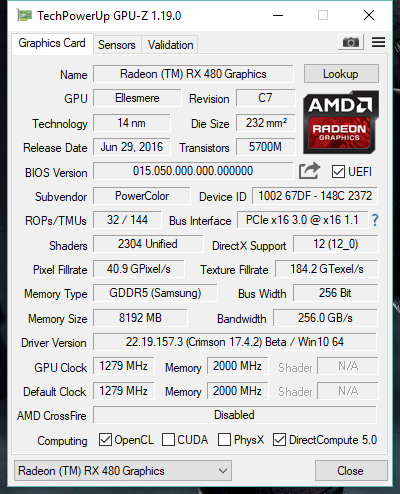 Edit2: Copying my 1750 timings to my 2000 timings increased my MH to 28 on my stock rom using Polaris ROM editor. I'm hoping to get 30, if possible. |
|
|
|
|
Deepcleen
Member
Offline
Activity: 116
Merit: 10
|
|
April 19, 2017, 06:57:09 AM |
|
|
|
|
|
|
|
jahras
|
|
April 19, 2017, 06:50:29 PM |
|
I modded my bios yesterday after this I cannot see temp readings or gpu frequency in gpu-z. anyone knows why?
asus dual 4gb
Thanks
|
|
|
|
|
|
Truthchanter
|
|
April 19, 2017, 08:59:00 PM |
|
The roms here are for ref 480s.. the red dragon gpu is non-ref and may not be compatible with the ref bios's. |
|
|
|
|
|



